15 Phishing Email Examples Security Teams See in 2026
15 phishing email examples for 2026: MFA fatigue, payroll lures, fake invoices. DBIR: 16% phishing as initial access; median sim click ~1.4%. Red flags and reporting playbook.

On this page 18 sections
The most common phishing email examples in 2026 look operationally normal: correct branding, plausible workflows, and urgency that matches how your finance or IT team actually works. The Verizon 2026 DBIR attributes 62% of breaches to the human element; phishing accounts for 16% of initial access in the breach sample. Median click rates in email phishing simulations sit near 1.4% (DBIR 2026, p. 50).
Examples teach patterns, not fear. Below are 15 categories security teams use in phishing simulations, starting with three patterns we see most often in enterprise inboxes this year.
We designed our example library around simulation templates teams actually run, not generic stock lures.
In conversations with CISOs, the useful question is not 'show me examples' but 'which examples match our top three failure modes this quarter.'
CrowdStrike's 2026 Global Threat Report documents how quickly evasive adversaries move after access: average eCrime breakout time fell to 29 minutes in 2025 (65% faster year-over-year), with the fastest observed breakout at 27 seconds. Incidents using fake CAPTCHA lures rose 563% compared to 2024, and attacks by AI-enabled adversaries increased 89% year-over-year (CrowdStrike 2026 Global Threat Report, p. 2, p. 9, p. 11, p. 12, p. 15).
2026 lure patterns: fake CAPTCHA and OAuth trust abuse
Two patterns map directly to inbox training. Fake CAPTCHA pages train users to solve a puzzle before malware or credential theft runs. Separately, Russia-nexus adversary COZY BEAR delivered Entra ID OAuth 2.0 links that redirected victims to authentic Microsoft login pages, removing suspicious-domain warnings (CrowdStrike 2026 Global Threat Report, p. 41–42). Simulations should include CAPTCHA-style landing pages and teach verification when MFA or OAuth flows arrive from chat or email.
| Metric | Value | GTR page |
|---|---|---|
| Fake CAPTCHA lure incidents (YoY vs 2024) | 563% increase | p. 12 |
| Attacks by AI-enabled adversaries (YoY) | 89% increase | p. 2, p. 15 |
| Average eCrime breakout time | 29 minutes | p. 11 |
| Detections that were malware-free | 82% | p. 11 |
| Valid account abuse share of cloud incidents | 35% | p. 3 |
What this means for security leaders
Example libraries must track lure mechanics, not only branded templates. Pair DBIR simulation medians (~1.4% email) with CrowdStrike operational speed stats when you justify report-rate SLAs and executive verification rules.
| Pattern | Why it works | Red flag |
|---|---|---|
| MFA fatigue / push spam | Users approve prompts to clear notifications | Multiple MFA pushes you did not start |
| Payroll direct-deposit change | HR workflows are trusted; timing hits pay cycles | Bank detail change with no ticket number |
| AI-crafted executive urgency | Tone matches real leadership; no spelling errors | Payment or credential request with no second-channel verify |
What this means for security leaders
Your CTR problem on example pages is usually a title mismatch: searchers want recognizable patterns and red flags, not a generic awareness essay. Lead with three concrete 2026 lures, tie each to a reporting habit, and baseline simulations against DBIR medians, not vanity completion rates.
For platform comparisons and multi-channel simulation, see our KnowBe4 alternatives (2026) guide.
Full list of phishing email examples by category:
For verified 2026 volume, cost, and multi-channel reference numbers (APWG, DBIR, IC3), see our 2026 phishing statistics guide.
1-Google Docs Scam
Using this phishing type, attackers send an email claiming a Google Doc is shared with you, complete with a link. The link redirects to a fake Google login page where, if you enter your credentials, scammers steal your login details.

2-Account Verification Scam
In this phishing scam example, emails pretending to be from well-known brands urgently ask you to verify your account details to “keep your account secure.” The link provided usually leads to a fake login page designed to capture your login credentials.

Microsoft email scams are especially common, with attackers posing as Microsoft, asking users to confirm account information or make security updates.
3-CEO Fraud
Also known as Business Email Compromise (BEC), in this phishing form, emails pretends to be from well-known brands urgently ask you to verify your account details to “keep your account secure.” The link provided usually leads to a fake login page designed to capture your login credentials. Tactic involves attackers posing as a company executive, such as a CEO or CFO.

This the most common examples of phishing email urgently instructs employees to transfer funds or share sensitive information, often emphasizing confidentiality or time-sensitivity to prevent verification. This creates a sense of pressure and authority, making employees less likely to question the request.
4-Tax Refund Scam
This common phishing email form targets individuals during tax season. Attackers pose as tax authorities, claiming a refund is due and requesting personal information. The email often appears authentic, complete with logos and legal jargon.


5-PayPal Scam
In this scam example, emails claiming to be from PayPal warn of “suspicious activity” on your account or say that your account has been frozen. The message urges you to log in and “verify” your account to restore access. However, the link leads to a fake PayPal login page designed to capture your credentials.

Protect your accounts by training employees to recognize phishing emails.
Keepnet platform
Turn awareness into secure behaviour
Training, multi-channel phishing simulations and reporting in one platform, measured by behaviour.
6-Dropbox Scam
In this phishing type, an email appears to be from Dropbox, notifying users that a file has been shared with them. The message includes a link to “view the file,” but clicking it leads to a fake Dropbox login page. If users enter their credentials, scammers capture their login information.

7-Suspicious Activity Alert
This phishing email example informs you of “suspicious activity” on your account, often mimicking banks or online payment platforms. The email pushes you to “verify” recent transactions, providing a link that leads to a phishing website.
8-Advanced Fee Scam
Sometimes known as a "Nigerian Prince scam," the advanced fee scam promises recipients a large sum of money in exchange for paying small upfront fees. These phishing emails exploit people’s hopes for quick financial gain.

9-The Fake Invoice Scam
Fake invoice phishing email forms target businesses by impersonating a legitimate vendor and requesting urgent payment. These email phishing scams often contain fake invoices that, if paid, funnel funds directly to cybercriminals.
To learn more about avoiding phishing attacks, explore how to recognize phishing emails here.

10-Requests for Personal Information
These phishing formsattempt to gather sensitive information, such as login credentials, Social Security numbers, or bank details, by posing as messages from trusted organizations. They often look like legitimate requests from banks, government agencies, or well-known companies to make recipients feel safe sharing their information.

11-Banking Alert Scam
A banking alert phishing scam warns recipients of unauthorized account activity. These real phishing email methods direct recipients to a fraudulent website to “verify” their banking information, leading to potential identity theft.

Protect Your Employees Against the Most Common Examples of Phishing Emails
Keepnet’s platform for human risk management and secure behaviour management provides a multi-channel simulation and training platform designed to address the most common examples of phishing emails:
Phishing Simulator
At Keepnet, our Phishing Simulator immerses employees in realistic attack scenarios, enabling them to quickly recognize and effectively respond to phishing attempts before any damage can be done.
Drawing on a large library of curated phishing examples (template counts vary by channel; see our KnowBe4 alternative page for full simulation scope), we deliver highly engaging and dynamic phishing tests that closely mirrors real-world threats. By doing so, we help foster a security-conscious culture across every level of your organization.
Our next-gen, AI-integrated platform is designed to be both multi-support and effortless to use, allowing administrators to rapidly roll out tailored campaigns via email, SMS, or other preferred channels.
This seamless setup ensures no interruption to your team’s daily workflow, while in-depth analytics provide clear visibility into performance and areas needing improvement. Whether it’s testing basic recognition skills or running advanced social engineering simulations, Keepnet’s Phishing Simulator equips your workforce with the skills they need to safeguard your organization against evolving cyber threats.

Security Awareness Training
At Keepnet, we deliver cutting-edge security awareness trainingspecifically designed to empower employees against ever-evolving cyber threats. Our platform seamlessly integrates with a variety of delivery methods, including SMS notifications, direct integration with existing LMS solutions, and compliance-focused modules, ensuring that each organization can easily reach its workforce wherever they are.
With phishing reporting rates and repeat-failure cohorts tracked in simulations, we take pride in providing a proven solution that fosters a genuinely security-aware culture across all levels of an enterprise.
Beyond our comprehensive training modules, we incorporate an effective Behavior Change Model that reinforces positive security habits and helps employees retain critical knowledge over the long term.
Our AI-powered approach provides in-depth analytics, allowing administrators to tailor training initiatives based on performance data and user feedback. By continuously updating our content to counter the latest phishing tactics, and offering flexible localization options to serve diverse teams around the globe, Keepnet is committed to guiding organizations toward a safer and stronger reporting habits and faster escalation when a lure feels routine.

Incident Response Tools
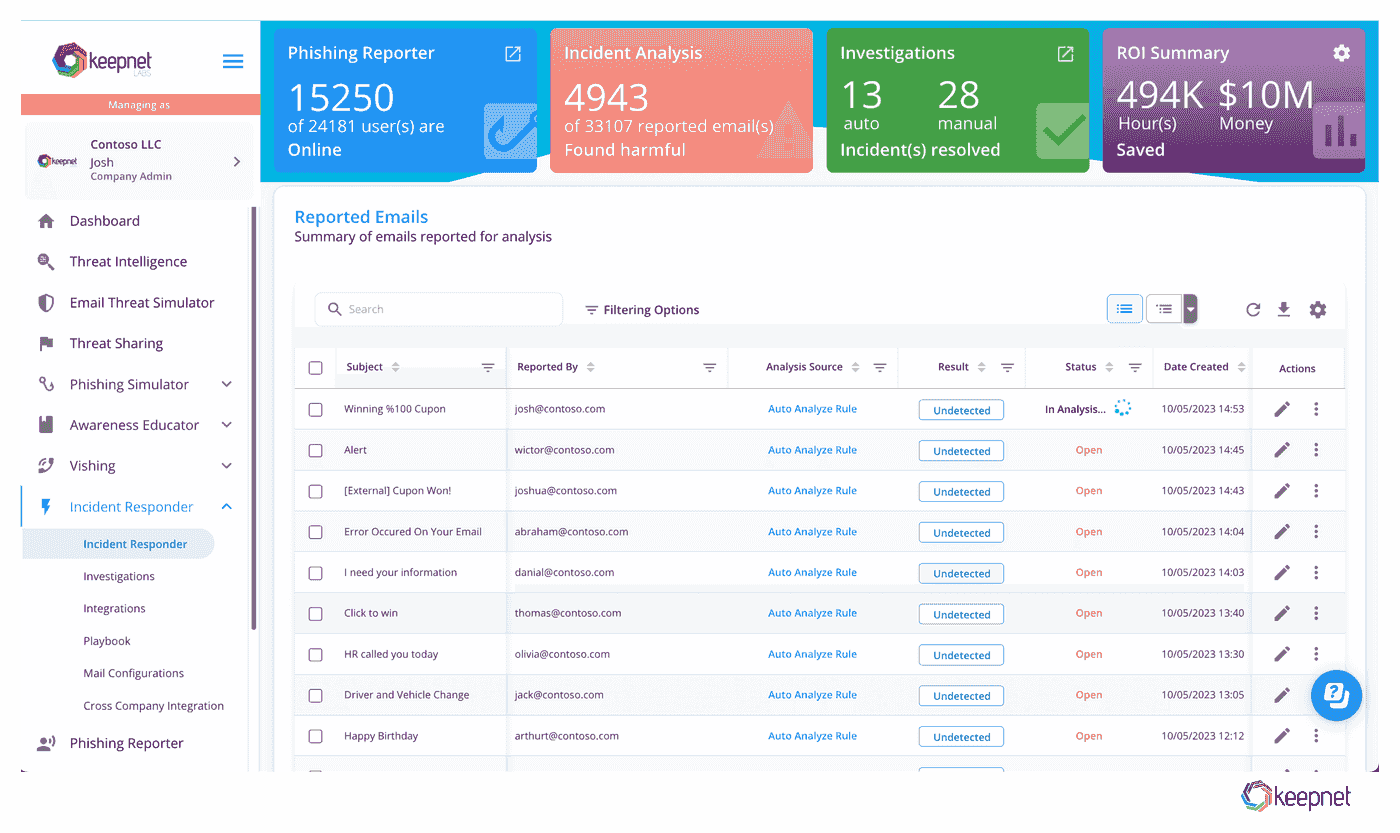
At Keepnet, our Incident Response Platform unify every stage of threat detection and mitigation into a single, streamlined interface. The embedded Phishing Reporter empowers employees to quickly flag suspicious emails for in-depth, automated analysis.
Our Incident Analysis engine then rapidly categorizes and prioritizes threats, helping security teams focus on the highest-risk issues first. Paired with a clear, real-time ROI Summary, organizations can easily quantify the tangible benefits, from hours saved to the financial impact avoided.
Beyond initial triage, our Investigations module offers both automated and manual paths to resolution, enabling teams to adapt workflows to the complexity of each incident.
Granular dashboards provide complete visibility, from the moment a user reports a suspicious email, through analysis and final remediation, ensuring critical details never fall through the cracks. With Keepnet’s Incident Response Tools, you can swiftly contain threats and confidently validate security measures, all while substantially reducing the time and resources required to keep your organization safe.
Discover how Keepnet secure behaviour management platform and advanced anti-phishing products can strengthen your organization’s defenses against these common threats. Start a free trial today to explore our phishing protection tools firsthand and boost your security awareness programs.

Check out the YouTube video below and learn how to spot the most common phishing examples of 2026 before they catch you off guard!

Further Reading on Phishing Examples
For deeper pattern libraries and channel-specific examples, start with these guides:
- phishing attack examples by type, industry and emotion: Phishing attacks in 2026 have evolved into highly deceptive, AI-driven campaigns that bypass traditional security tools. From deepfake voice calls to dynamic QR code phishing, attackers exploit trust at scale. Six advanced examples show what to rehearse in simulations.
- Phishing Examples by Emotional Triggers: Modern attacks succeed by exploiting fear, urgency, greed, trust, curiosity, and guilt. This guide maps real-world examples to each trigger and shows how behavior-based training helps employees pause before they click.
- 10 Real-Life Callback Phishing Examples: Callback phishing tricks victims into calling fake support numbers that lead to credential theft or malware. Ten real scenarios plus practical steps to protect your help desk and employees.
- 10 Examples of Spear Phishing Attacks: Spear phishing targets specific individuals, often executives or finance staff, using personalized messages. Ten real examples show how costly impersonation and vendor fraud can be.
- 10 Real-Life Quishing Attack Examples: Quishing (QR code phishing) is rising in emails, posters, and meeting invites. Ten examples help you train employees to verify codes before they scan.
- 10 Real-Life Smishing Examples: Smishing uses SMS to deliver malicious links or impersonate trusted brands. Ten examples show why mobile-first awareness matters alongside email training.
- Vishing Statistics 2026: Unmasking the Voice Phishing Trends: Voice phishing has surged with AI-generated voices and spoofed caller IDs. Latest statistics, examples, and call scenarios to prepare teams for audio-based deception.
How to Use Examples for Better Decisions
Phishing examples are useful when they teach patterns, not when they become a gallery of screenshots. Teams learn more when examples are tied to why the email worked, what signal was easy to miss, and how the user should respond the next time a similar message arrives.
That is especially important in 2026 because many phishing emails look operationally normal. A good example set should help users notice context problems, trust abuse, and workflow mismatch, not just spelling mistakes or suspicious branding.
Example Review Checklist
- Group examples by tactic such as invoice fraud, login lure, collaboration lure, or callback pressure.
- Explain which business habit the attacker is trying to exploit.
- Show what a safe response looks like, not only what a bad email looks like.
- Refresh the examples so they match current platforms and current communication styles.
Related reading
Phishing Examples by Emotional Trigger and Industry
Attackers pick the emotion first and the brand second. The same lure is then reworded for each industry, so it matches what employees expect to see.
- Fear: "your account has been compromised" alerts and legal threats that push employees to log in at once.
- Urgency: invoices due today, expiring passwords and missed deliveries.
- Greed: refunds, bonuses, prize notices and investment offers.
- Authority: messages that appear to come from the CEO, IT support or a bank.
- Curiosity: shared documents, voicemail notifications and unexpected delivery notices.
- Finance: fake transaction alerts and bank impersonation asking employees to verify credentials.
- Healthcare: requests for patient records and fake notices from health authorities.
- Retail and e-commerce: supplier invoice changes and order problems.
- Education: fake financial aid messages and IT password resets.
- Manufacturing and logistics: shipping documents and vendor payment changes.
Use the same mix in your phishing simulations: test each emotional trigger and the lures that match your industry, not only generic emails.
Sources
- CrowdStrike, 2026 Global Threat Report (Year of the Evasive Adversary), p. cited in body.
Frequently asked questions
A typical example has the subject line "Action required: your password expires today". The sender name reads "IT Service Desk", but the address uses a lookalike domain. The message warns that your account will be locked and offers a "Keep my password" button that opens a fake Microsoft 365 sign-in page built to capture your credentials.
A phishing email is a message that pretends to come from someone you trust, such as a bank, a supplier, a colleague or a service like Microsoft 365, to make you click a link, open an attachment, share a password or send money. It usually copies real branding and adds a reason to act quickly.
Common phishing email examples include fake invoices, account verification requests, CEO fraud asking for an urgent payment, tax refund notices, shared document alerts from services like Google Docs or Dropbox, PayPal and banking alerts, and suspicious sign-in warnings. Each one copies a message employees already expect to receive.
A phishing email often looks almost right: a familiar logo, a sender name you recognise and a subject line asking you to act now. The giveaways are small, such as a sender address on the wrong domain, a link that points elsewhere when you hover over it, or an unexpected attachment. Our guide on how to spot phishing emails covers each sign.
Usually not. In an up-to-date email client, opening a message rarely runs any code; the risk starts when you click a link, open an attachment, reply or enable macros. Opening can still load remote images that confirm your address is active, so report the email instead of ignoring it. If you have already clicked, see what to do if you click on a phishing link.
Fake CAPTCHA pages are a fast-growing lure: CrowdStrike recorded a 563% rise in incidents using them in 2025 compared with 2024 (CrowdStrike 2026 Global Threat Report, p. 12). Attackers also send emails that ask users to approve access for a fake app, which can give them access to a mailbox without stealing a password.
Schedule your 30-minute private demo now.
You'll learn how to:
- Create phishing email templates using Keepnet Phishing simulator
- Generate automated AI-based phishing email template under a minute
- Launch email phishing campaign to test and train your employees
30 minutes with a Keepnet specialist, on your own use cases.

Author
Ozan Ucar
Founder and CEO, Keepnet
Ozan founded Keepnet in 2017 and has worked in cyber security since 2006. He leads Keepnet's product direction and works with security teams on measuring and changing the behaviours behind incidents.