10 Real-Life MFA Phishing Attacks and How to Defend Against Them
MFA phishing attacks are becoming more advanced each year. Explore ten real-life examples, from credential stuffing to quishing, and learn strategies to protect your organization. Keepnet’s approach helps enhance defenses and reduce phishing risks effectively.

On this page 14 sections
In 2024, phishing attacks have become more advanced than ever, and MFA phishing is a top strategy used by cybercriminals to bypass security measures. As companies adopt multifactor authentication (MFA) to secure accounts, threat actors are adapting quickly, launching complex MFA phishing attacks that target employees at all levels. Learn more: What Is Phishing How To Protect Yourself From It.
To stay one step ahead, it’s critical to understand real-world MFA phishing techniques and equip your organization with the right defenses.
Here, we’ll explore 10 notable MFA phishing examples, their impact, and how tools like those from Keepnet can safeguard your business.
Understanding the Growing Threat of MFA Phishing
MFA phishing attacks exploit the assumption that multifactor authentication makes accounts fully secure. In reality, attackers use increasingly sophisticated strategies to bypass these barriers. By targeting human weaknesses like vulnerability to social engineering, attackers can get around MFA through methods such as credential stuffing, vishing, and man-in-the-middle (MITM) attacks. These tactics have made MFA phishing a significant security threat for organizations worldwide.
What makes this threat even more challenging is attackers’ use of multiple phishing techniques at once, creating a layered, hard-to-detect approach. For example, attackers may use SIM swapping to intercept push notifications, set up fake authentication portals, or send fraudulent SMS prompts urging users to reset MFA tokens. This rising sophistication calls for more advanced defenses, tools and training that go beyond traditional measures.

10 Real-Life MFA Phishing Examples
Take a look at these real-life MFA phishing examples to see how attackers use various tactics to exploit both human and system vulnerabilities. Each example highlights different techniques, from social engineering to technical manipulation, showing the evolving sophistication of MFA phishing attacks.
Understanding these scenarios can help your organization recognize and respond to similar threats effectively.
Credential Stuffing Through SMS Authentication
Credential stuffing exploits users who reuse passwords across different accounts. In this type of attack, cybercriminals send SMS messages that prompt users to verify "suspicious activity." The urgent language tricks users into clicking a link and entering their credentials on a fake login page. Once they input their credentials, attackers capture both the login details and MFA codes, using them to access the account.


Solution: Educate employees on password hygiene and conduct regular Security Awareness Training through Keepnet’s Phishing Simulator to build resistance against SMS-based phishing.
Man-in-the-Middle (MITM) Attack on Authentication Portals
In a Man-in-the-Middle (MITM) attack, attackers set up fake login pages that mimic legitimate MFA portals. When employees enter their credentials and MFA codes, the attackers intercept both, gaining direct access to the account. These attacks often use lookalike domains and highly convincing phishing emails to lure users to the fake page, making detection difficult.


Solution: Keepnet’s secure behaviour management platform can help detect unusual behavior patterns and alert your team to potential compromises early on. Learn more here.
Voice Phishing (Vishing) Scams Exploiting MFA
In vishing attacks, scammers impersonate IT support and call employees, claiming they need to “verify” security details or MFA codes. They often cite suspicious account activity to create urgency, convincing employees to share their MFA codes over the phone. Once obtained, attackers use these codes to gain unauthorized access to accounts.

Solution: Prepare employees for vishing scams by regularly simulating these scenarios with Keepnet’s Vishing Simulator. This training helps staff recognize and respond confidently to these social engineering tactics

Keepnet platform
Turn awareness into secure behaviour
Training, multi-channel phishing simulations and reporting in one platform, measured by behaviour.
Push Notification Fatigue Exploits
Push notification fatigue exploits involve sending users repeated MFA approval requests until they finally approve one just to stop the interruptions. This tactic often succeeds with employees who are not familiar with how to handle constant login prompts.

Solution: Through Security Awareness Training, employees can learn how to handle persistent login prompts without falling prey to attacks. Keepnet’s Awareness Educator offers resources on these types of MFA challenges.
Phishing Emails Mimicking MFA Configuration Requests
Phishing emails mimicking MFA configuration requests are a common tactic to fool employees into thinking they need to update their MFA settings. When they follow the link, they’re directed to a fake login page where credentials and MFA codes are captured.

Solution: Keepnet’s Phishing Simulator replicates similar phishing emails, helping employees recognize the red flags of MFA phishing schemes.
QR Code Phishing (Quishing)
Quishing involves embedding malicious QR codes in emails or printed materials. These codes direct users to phishing sites where they unknowingly enter credentials and MFA information. This method is gaining popularity as QR codes become more commonplace.
Solution: Keepnet’s Quishing Simulator prepares employees to recognize and respond to QR-based phishing risks.

Browser-in-the-Browser (BitB) Attacks
Browser-in-the-Browser (BitB) attacks use a fake browser window within a victim’s actual browser, making it appear as though they’re accessing a legitimate MFA portal. This creates an illusion of security while secretly capturing MFA tokens and login credentials. Recent fake recruiter campaigns use this technique on interview booking pages, as described in our analysis of fake recruiter phishing that targets corporate logins.
Solution: Educate employees on spotting BitB attacks using Security Awareness Training from Keepnet. This training ensures employees understand the tricks attackers use in sophisticated phishing schemes.
Callback Phishing with MFA Verification
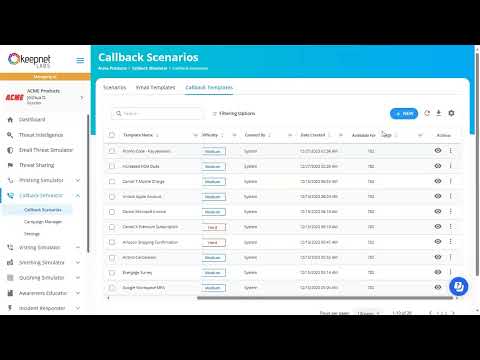
Callback phishing involves attackers calling employees and requesting them to verify their MFA codes. Posing as support staff, they establish credibility and convince victims to share verification codes over the phone, granting them unauthorized access.
Solution: Keepnet’s Callback Phishing simulation tool provides practical training, helping employees build resistance against social engineering attacks conducted over the phone.
Using Fake Authentication Apps to Capture MFA Tokens
In this method, attackers convince employees to download fake authentication apps by claiming these apps provide added security or simplify the MFA process. Often, they pose as IT support or send emails with links to the fake app, making it appear official. Once installed, these apps capture MFA codes and other login details in real-time, sending them directly to the attackers.
Solution: Security Awareness Training through Keepnet’s Threat Intelligence solutions educates employees on identifying and avoiding such apps. Training keeps employees alert to unusual app requests or installation prompts.
Intercepting Push Notifications with SIM Swapping
In a SIM swapping attack, cybercriminals take control of a victim’s phone number by tricking the phone provider into transferring it to a new SIM card they control. With access to the victim’s phone number, attackers can receive MFA push notifications and gain unauthorized access to accounts that rely on phone-based verification.
Solution: Leveraging Incident Response through Keepnet can quickly address SIM-swapping incidents, helping reduce the risk of unauthorized account access.
Protecting Your Organization Against MFA Phishing with Keepnet
Keepnet provides the essential tools and training needed to protect your organization against sophisticated MFA phishing attacks through a multi-layered approach of technology, training, and real-time response.
- Continuous Security Awareness Training: Consistent training helps employees recognize threats like vishing and callback phishing. Keepnet’s Security Awareness Training and phishing simulators build essential skills to spot and avoid common MFA phishing tactics.
- Simulate Phishing and Quishing Attacks: Tools like Keepnet’s Phishing Simulator and Quishing Simulator prepare employees for real-world phishing tactics, helping them identify malicious links, emails, and QR codes.
- Integrate Incident Response Systems: Keepnet’s Incident Responder provides fast detection and action when a breach occurs, limiting damage and mitigating risks.
- Leverage a secure behaviour management platform: Keepnet’s secure behaviour management platform offers insights into employee behavior, enabling teams to detect risky actions and track security awareness engagement.
By deploying these measures with Keepnet’s suite of tools, your organization can better defend against evolving MFA phishing threats.

Frequently asked questions
MFA phishing is any attack designed to defeat multi-factor authentication rather than avoid it. The attacker captures both the password and the second factor, usually by relaying them in real time to the genuine login page.
Yes, and routinely. Relay proxies, fake authentication portals, SIM swapping, approval fatigue prompts, browser-in-the-browser windows and fake authenticator apps all target the second factor directly.
The attacker already holds the password and triggers approval prompts repeatedly until the user accepts one to stop the noise, often late at night. Number matching helps, and so does a culture where an unexpected prompt gets reported rather than dismissed.
Hardware security keys and passkeys bound to the origin, because they refuse to authenticate against a lookalike domain. SMS codes are the weakest common method, since they can be relayed or intercepted.
A caller poses as IT support and asks the employee to read a code aloud, and a QR code moves the victim to a phishing portal on a phone where the address bar is hard to inspect. Smishing volume rose 30 to 40% quarter on quarter through 2025 (Anti-Phishing Working Group, Phishing Activity Trends Report, Q4 2025, p. 4).
Simulate it. A programme that only sends email never tests whether someone will read a code aloud on a call or approve a prompt they did not trigger, and those are the behaviours that decide the outcome.
Schedule your 30-minute private demo now.
You'll learn how to:
- Simulate advanced MFA phishing attacks to increase employees’ awareness of sophisticated phishing tactics.
- Tailor MFA phishing prevention strategies to meet the specific needs of your organization and industry.
- Utilize real-time incident response tools to reduce risk exposure and swiftly handle phishing-related incidents.
30 minutes with a Keepnet specialist, on your own use cases.

Author
Ozan Ucar
Founder and CEO, Keepnet
Ozan founded Keepnet in 2017 and has worked in cyber security since 2006. He leads Keepnet's product direction and works with security teams on measuring and changing the behaviours behind incidents.