Incident Responder



Reported emails, SMS and calls, analysed in one queue.
Phishing analysis and incident response that gives the employee a verdict and your SOC the evidence.
A verdict with its evidence, not a score
Built for what gateways let through. Integrations and playbooks check every report; optional AI agents read what it asks for.
Trusted every day by security teams that measure behaviour, not attendance










How phishing incident response works
From an employee’s report to a blocked threat
Employees report from where they are. Keepnet analyses it, answers them and hands your team the evidence.
1. Report
One tap, from the tool employees already use.
- Outlook and Gmail report button
- Microsoft or Proofpoint report button, kept as it is
- SMS and calls from an iPhone or Android app
2. Analyse
Integrations and playbooks check it. Optional AI agents add an analyst’s read.
- Threat intelligence and sandbox engines
- Playbook rules you set
- Optional AI agents, on your own key if you prefer
3. Respond
The employee hears back. The threat is contained.
- Verdict to the employee who reported it
- Copies removed from other mailboxes
- Indicators sent to your SOAR to block
Suspicious SMS and calls get a verdict too
The Keepnet SMS and Call Reporter app, for iPhone and Android, sends them to the same queue as email.
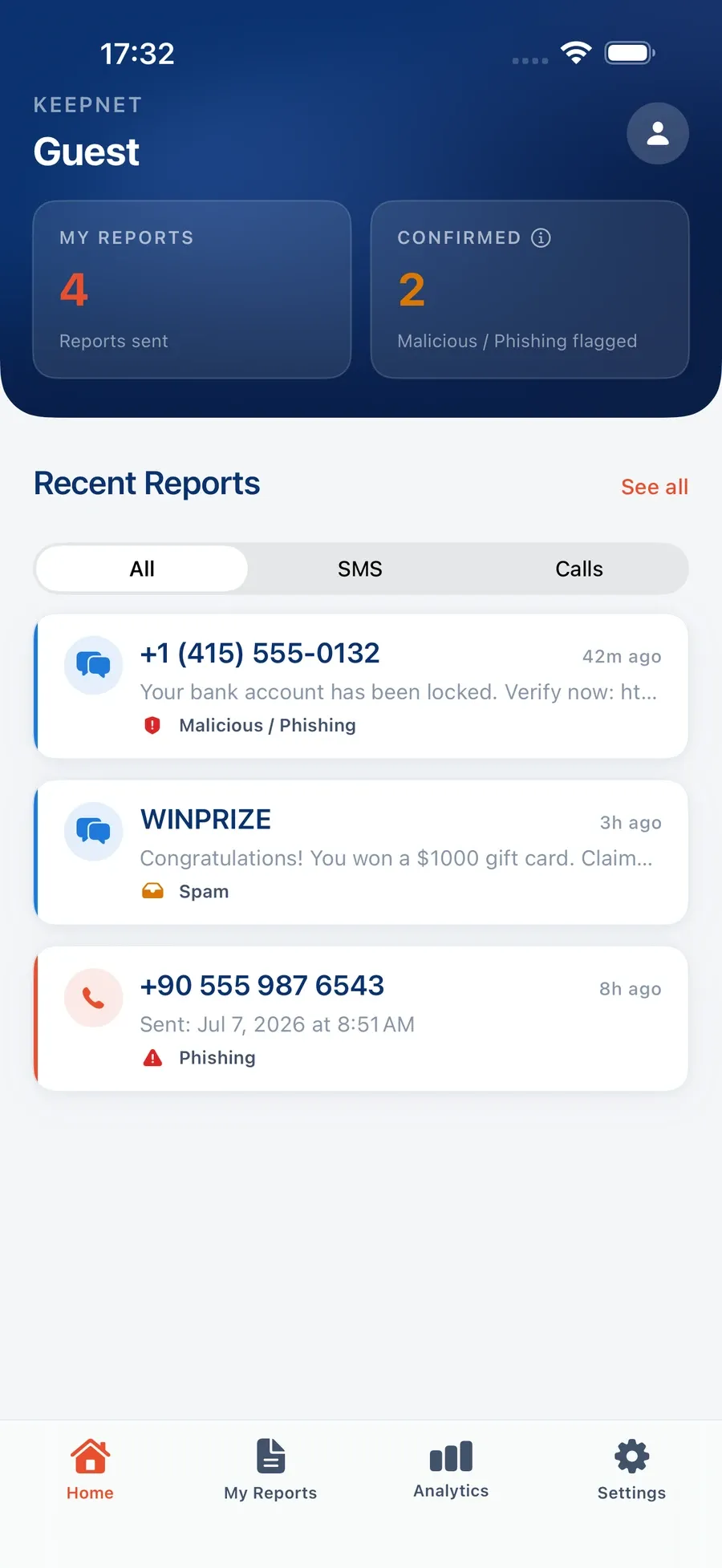
Recent reportsSMS and calls, each with its result. 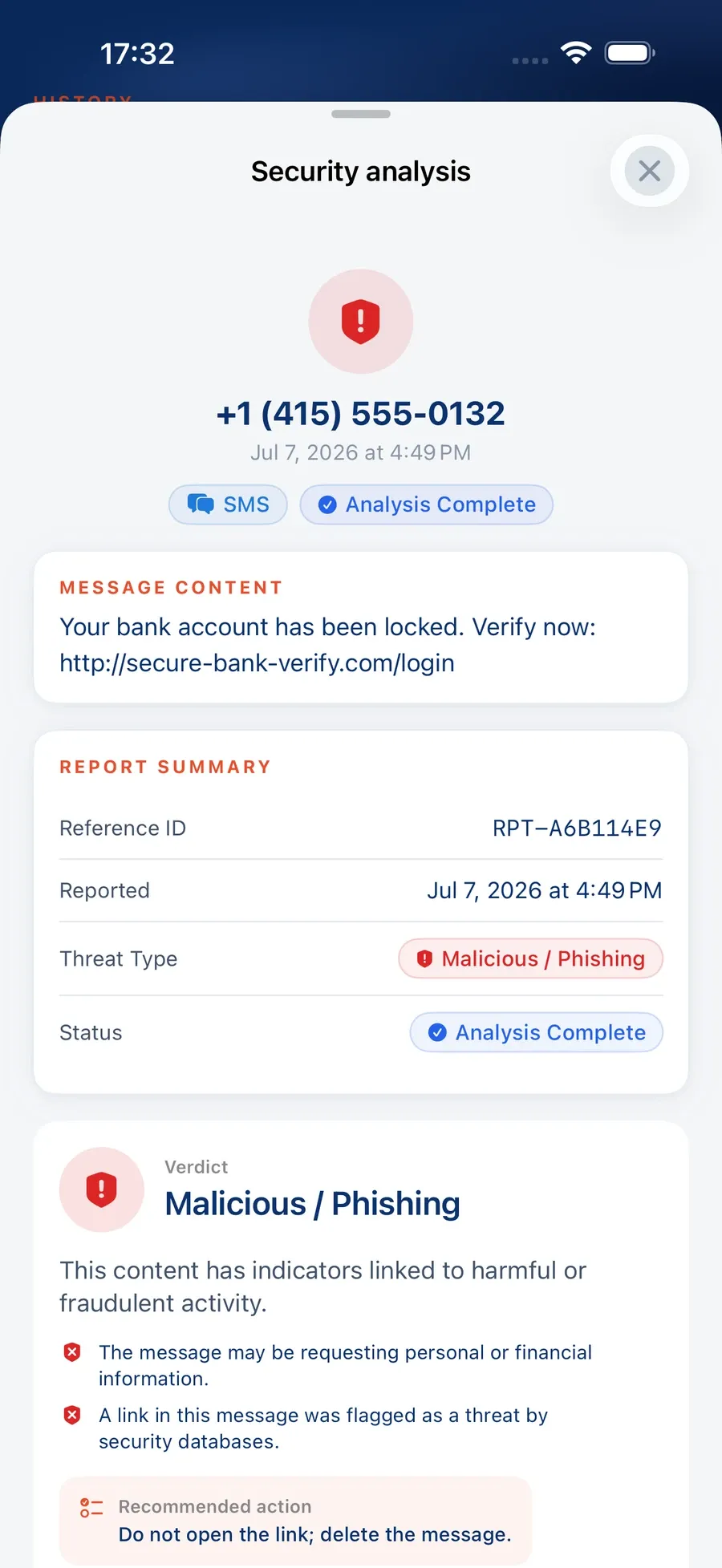
The verdictWith the reasons and what to do. 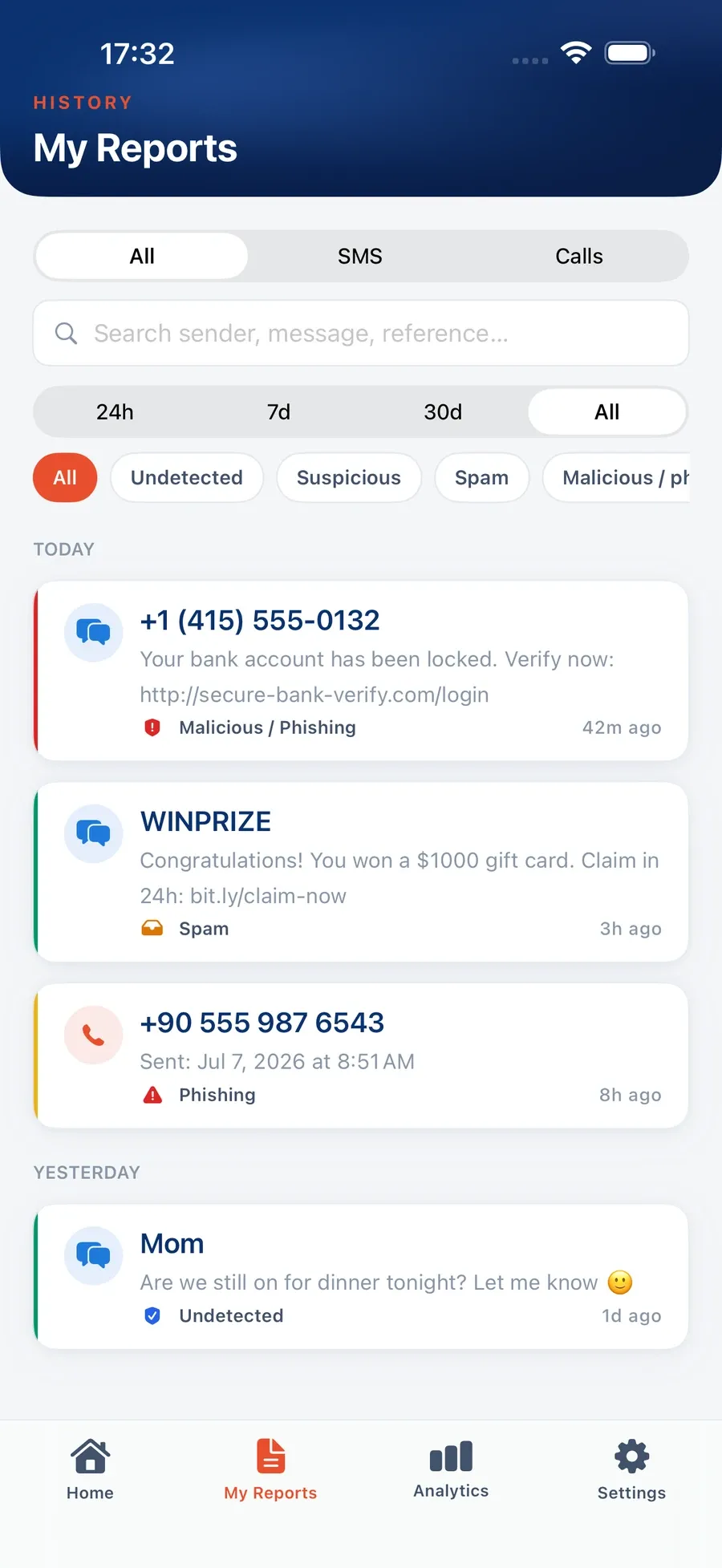
Report historyFilter by SMS or calls, and by result.
- One tap to reportFrom the app, or from the Messages junk-reporting flow on iPhone.
- A verdict with the reasonsNo threat detected, suspicious, spam or malicious.
- One queue for the SOCSMS and call reports sit next to email reports in Incident Responder.
- Only what the employee reportsThe app does not read messages or record calls.
Keep the report button employees already use
A copy of each report reaches Keepnet. Your existing setup stays as it is.
 Microsoft Report button
Add your Keepnet address to Defender’s user-reported settings. Defender carries on, and Keepnet gets a copy.
 Proofpoint report button
Keep it. Reports are forwarded to Keepnet and handled with your settings.
Any tool that forwards
If it can forward a copy of the reported email, it works with Keepnet.
 Keepnet Phishing Reporter
One button across Outlook desktop, web, new and mobile, deployed centrally. It can also pass reports on to Microsoft Defender.
SMS and Call Reporter
For suspicious SMS and calls on a work or personal phone.
Simulations counted
A reported Keepnet simulation is recognised as one and counted in your reporting rate.
Your playbooks, your rules
Decide what runs on its own and what waits for an analyst.
Fromcontains@payroll-update.coAttachment extensionis.htmlMark as→PhishingInvestigate→find and remove copiesNotify→reporter and SOC, your wordingTag→payroll- Conditions you already think in
- Sender, recipients, sender IP, subject, keywords, attachment name, hash or extension.
- Actions that close the loop
- Mark, analyse, investigate, notify, set status and tag, in the order you set.
- Messages in your words
- What the employee and the SOC receive is yours to edit.
- Priority when rules overlap
- Higher-priority rules win, so exceptions stay exceptions.
One verdict, acted on across your stack
Remove the email, block what it carried and keep the record.
noreply@forms.email and the Reply-To domain proton.me.Phishing remediation in mailboxes
An investigation finds the reported email and its variants in the mailboxes that received it, then removes or tags them.
Indicators to your SOAR
The sender, links, IPs and file hashes go out by API or webhook, so your SOAR can block them.
The engines you already trust
Links, IPs and files are checked on your own API keys, or by your own analysis API.
Agents that triage, contain and report, as far as you let them
Optional, and off until you turn them on. Use Keepnet’s model or bring your own key (BYOK). Steps wait for your approval unless you allow otherwise.
ISO/IEC 42001 certified · A worked example in the console’s Agentic AI chat, not a live session.
Employees hear back, so they keep reporting
Each report gets an answer, and counts as secure behaviour.

Dear Sarah Hughes{OWNER},
Scanning of the suspicious email you reported has been completed.
Scan Date: 05/10/2026 14:20 UTC{DATE}
Scan Result: Malicious{STATUS}
Details:
Reported by: s.hughes@company.co.uk{REPORTBY}
From: noreply@forms.email{FROM}
To: invoices@company.co.uk{TO}
Subject: Payment due today: invoice #50809859{SUBJECT}
Attachment: INV-50809859.pdf{ATTACHMENT}
Date: 05/10/2026 14:16 UTC{CREATEDATE}
- A verdict for the reporterSimulation, phishing, spam or safe, in wording you choose.
- Reporting counted as a positive behaviourIt shows on the employee’s record and on the Secure Behaviour Dashboard.
- Reporting rate and time to reportFor simulations and for reported threats alike.
The evidence is published, not on request


Four current certifications, independently audited. Certificates and the full control set are published at doc.keepnetlabs.com/resources/compliance.
Incident Responder pricing
Priced per employee, bought on its own or with the rest
Incident Responder works without the simulators or the training. The SMS and Call Reporter app is free for employees.
The things buyers ask
The questions we hear most often.
Phishing incident response is what follows an employee’s report of a suspicious email, SMS or call: analysis, a verdict, and containment of confirmed threats.
Keepnet Incident Responder does that analysis and response, and answers the employee who reported it. It starts from the report, so it runs alongside the email gateway you already have.
Your integrations and playbook rules check the sender, headers, links and attachments. If you turn on the optional AI agents, they also read the message and work out what it asks for: credentials, a payment, a malware install or a sale.
URLs, IPs and files go to the threat intelligence and sandbox engines you connect. With AI agents on, links are also opened in a browser and screenshotted, and each verdict comes with a category, a confidence level, the indicators found and ruled out, and recommended actions. See an example verdict.
Playbook rules can mark known senders, and the optional AI agents label the rest as marketing, spam, internal or benign, so they do not take an analyst’s time.
Under the policy you set they are closed without an analyst, and the employee who reported them still gets an answer.
Yes. Add your Keepnet reporting address to the user-reported settings in Microsoft Defender, and the Report button and your Defender setup carry on as they are.
A copy of each report reaches Keepnet, where it is analysed, answered and counted in your simulation results.
No. AI agents are optional and stay off until you turn them on. Without them, reports are analysed by your integrations, threat intelligence, sandboxes and playbook rules.
When you turn them on, you can use Keepnet’s model or bring your own key (BYOK). Their steps wait for your approval unless you allow otherwise.
Yes, if the tool can forward a copy of the reported email to your Keepnet reporting address. Proofpoint’s report button works this way.
Keepnet’s own Phishing Reporter covers Outlook desktop, web, new and mobile, and Google Workspace, and is deployed centrally.
Yes, with the free Keepnet SMS and Call Reporter app for iPhone and Android. Employees report in one tap and get a verdict with the reasons.
The verdict is one of no threat detected, suspicious, spam or malicious. The app only sees what an employee chooses to report: it does not read messages or record calls. Reports reach the same Incident Responder queue as email.
Yes. They hear whether it was a simulation, phishing, spam or safe, in wording you can change.
Each report also counts as a positive behaviour on the employee’s record and on the Secure Behaviour Dashboard.
Through the Keepnet REST API and webhooks: your SOAR receives the verdict and the indicators, such as the sender, URLs, IPs and file hashes.
Your SOAR can then block them on the firewall, DNS security and DLP. Audit logs stream to Splunk or to a syslog receiver.
The ones you connect, on your own API keys: VirusTotal, IBM X-Force, FortiSandbox, VMRay, ANY.RUN, OPSWAT MetaDefender, Google Safe Browsing, Google Web Risk, Spamhaus ZEN, USTA and Cyber X-Ray.
You can also send reported URLs to your own analysis API and use its verdict.
Yes. An investigation finds the reported email and its variants in the mailboxes that received it, then removes or tags them.
It works on Microsoft 365, including GCC High and DoD, Google Workspace and Exchange Server.
Only the reported email is analysed, and nobody, your own administrators included, can browse employees’ mailboxes through Keepnet.
Reported emails are stored encrypted with AES-256, in the region you choose.
Yes. Every Keepnet product can be bought on its own.
Prices are published up to 1,000 employees and quoted above that. See the full price list and features.
Each comparison is published in full, with its sources: KnowBe4, Hoxhunt, Adaptive Security, Proofpoint.
A vendor’s own comparison is a starting point rather than the verdict.
See Keepnet with your organisation in mind
- Report from Outlook, a phone or your current buttonEmail, SMS and calls arriving in one queue.
- See a verdict with its evidence, with AI agents on or offOn a reported email of your choosing.
- Build a playbook from your own rulesWhat closes on its own, what waits for an analyst.
- Try it on your own reportsIf it fits, a proof of value follows, on your timeline.

Book a demo
Thirty minutes, no cost and no obligation.
Thank you, your request is in
A confirmation is on its way to your inbox.
Thirty minutes with the Keepnet team, on Microsoft Teams. Your details are already filled in.
Prefer to pick a time later? The team will follow up within one working day.
Your demo is booked
A calendar invite is on its way to your inbox, with a Microsoft Teams link.
The booking calendar will not open in this page.
Open the calendar in a new tabSources
- Gartner, “Ditch Security Awareness and Adopt AI-Powered Secure Behavior Management” (G00860839, September 2026), 2026 Gartner CISO Role Survey (n=297).
- Verizon, 2026 Data Breach Investigations Report, p. 50. Median click rates in phishing simulations: about 2% for phone-based, about 1.4% for email.
- Gartner, “6 Ways to Transform Your Cybersecurity Awareness Program” (G00840741, March 2026), 2025 Secure Behavior Strategies Survey (n=65).
Page reviewed