Threat intelligence



Find the compromised employee credentials that put your organisation at risk
Match your employees' emails against breach and leak data, and act on each one.
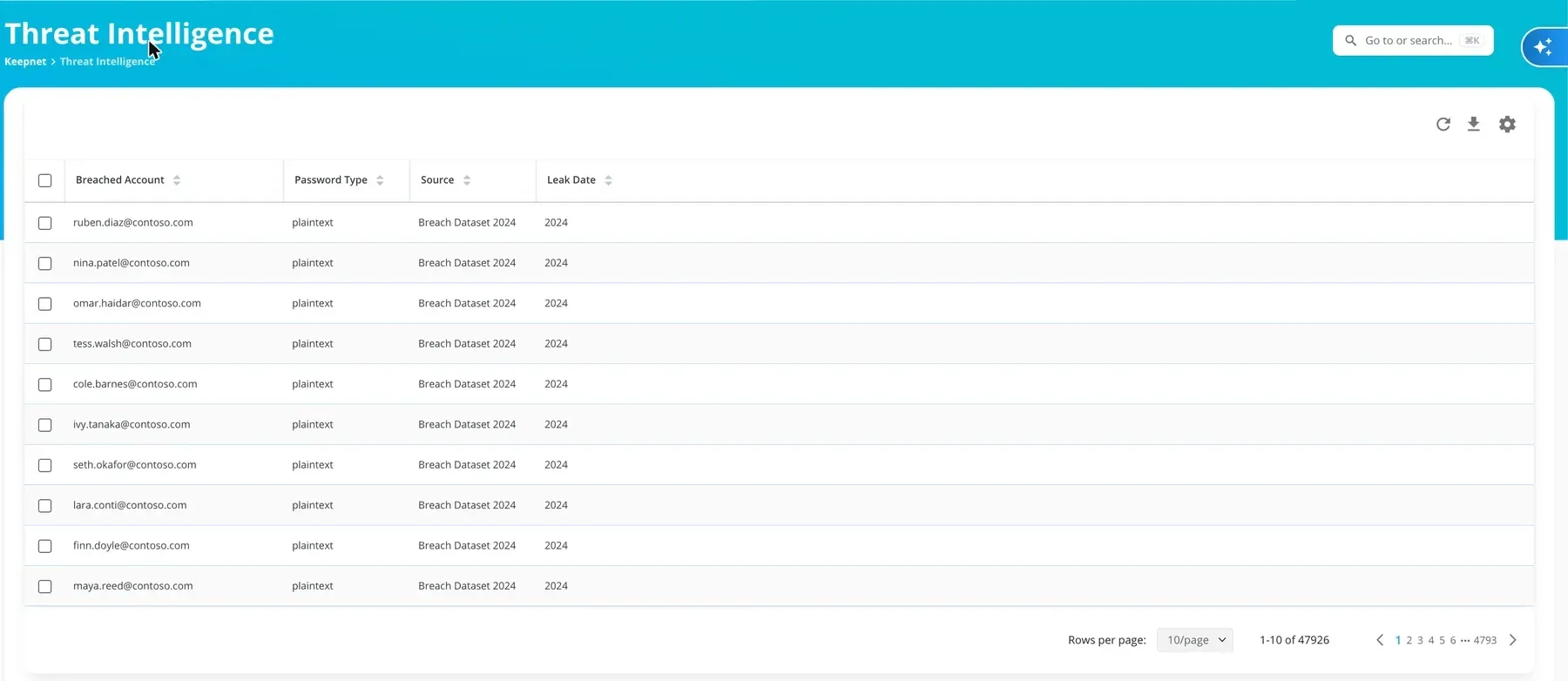
See which employees' credentials have leaked
Found across public breach and leak sources, including the deep web and third-party providers.
A leak elsewhere is a signal here. Practise with employees in the multi-channel phishing simulator.
Trusted every day by security teams that measure behaviour, not attendance










Attackers do not break in, they sign in
How it works
Find, report, act
From a leak elsewhere to an action here.
1. Find
Employee emails matched against public breach and leak sources.
- Matched by email address
- From breach datasets, the deep web and third-party providers
- No employee is contacted
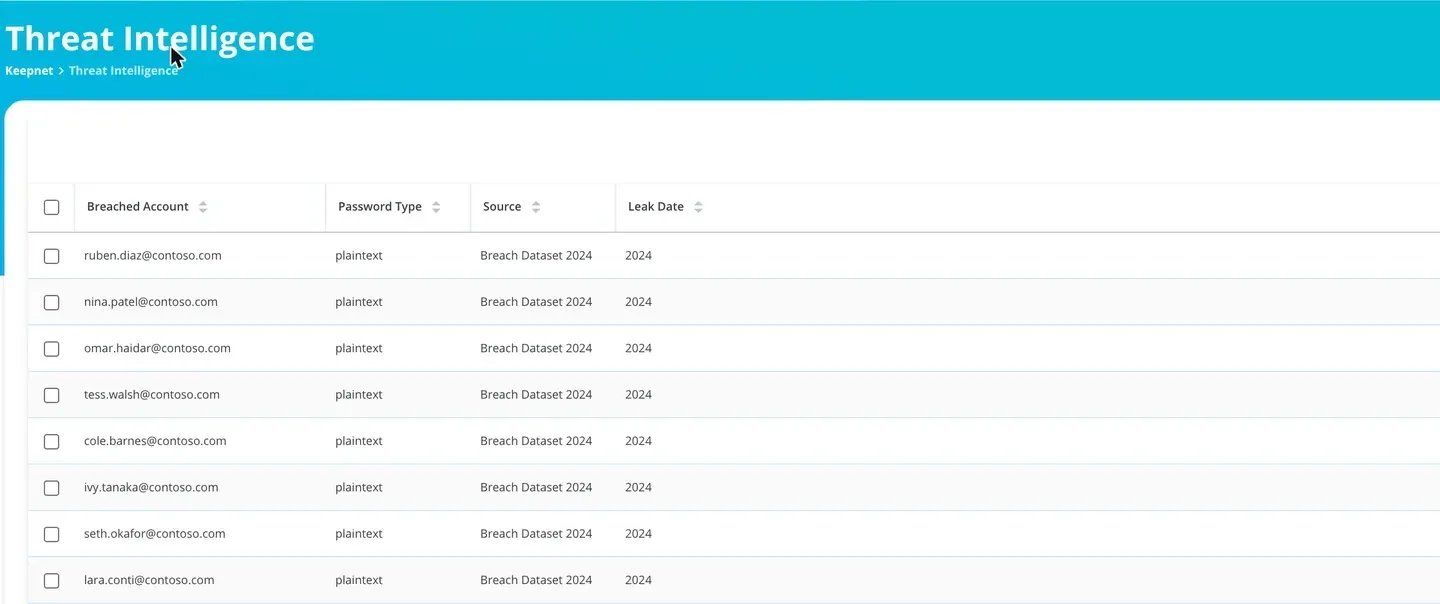
2. Report
How exposed each account is.
- Account and password type
- The source and the leak date
- Export the findings
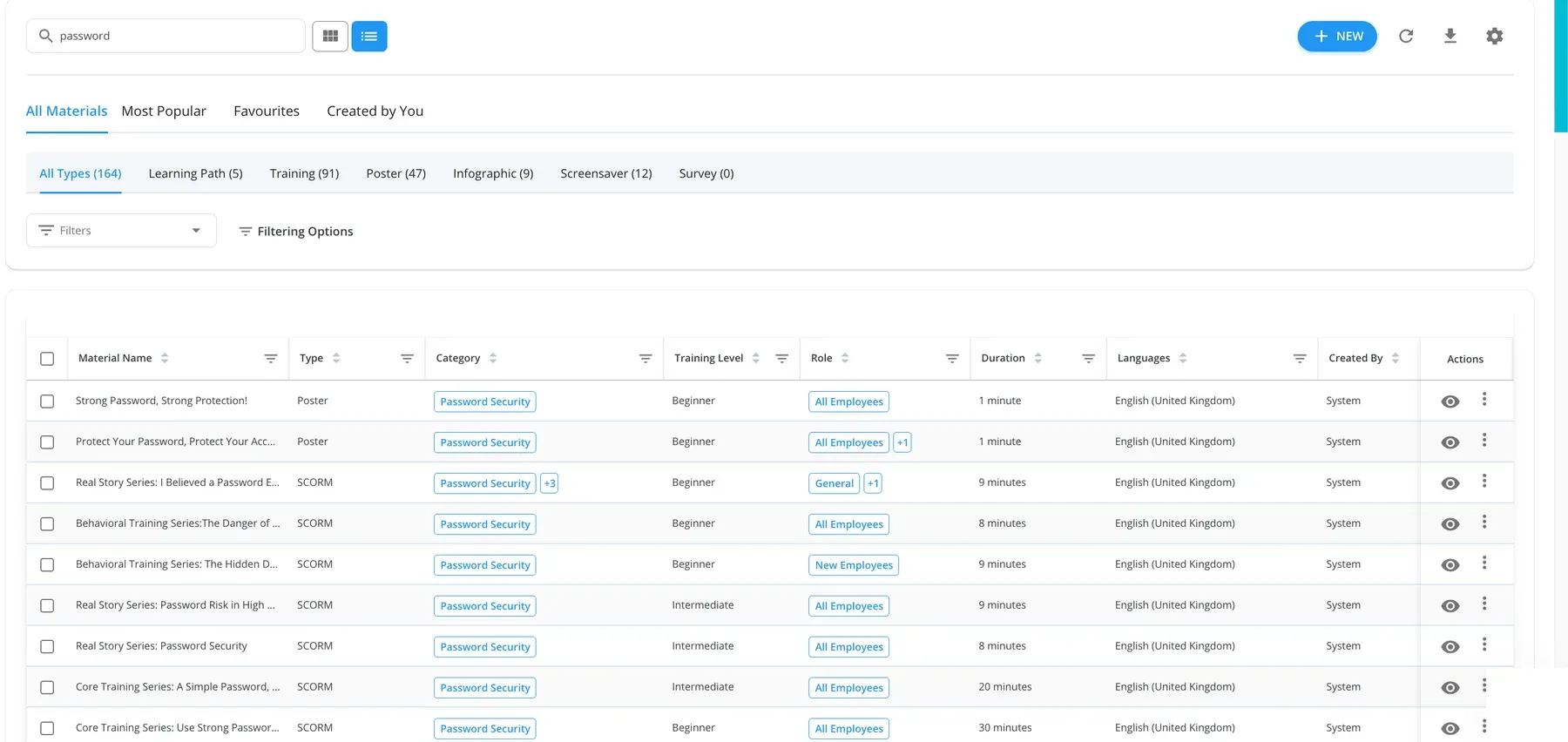
3. Act
Each leak becomes a next step for that employee.
- Targeted training for the employee
- A targeted simulation
- A risky-behaviour signal on their record
A leaked credential becomes an action
The detail you need to judge the risk
The account
The employee email found in a breach.
Password type
Plaintext or hashed, so you can judge the risk.
Source
Where it surfaced: a breach dataset, the deep web or a third-party provider.
Leak date
When it was exposed.
Questions to ask a compromised credential vendor
| Question | Keepnet |
|---|---|
| Does a finding lead to action? | Yes: training, a simulation and a risky-behaviour signal. |
| How are leaks matched? | By employee email address against public breach and leak sources. |
| What detail is shown? | Account, password type, source and leak date. |
| Does it store employee passwords? | No. It shows the password type, not a password store. |
| Where is the data kept? | In the region you choose. |
| Can we buy it on its own? | Yes. |
The evidence is published, not on request


Four current certifications, independently audited. Certificates and the full control set are published at doc.keepnetlabs.com/resources/compliance.
Pricing
Buy threat intelligence on its own
Priced per employee, as part of the secure behaviour management platform.
See the plan prices- Pay only for what you runStart with one simulator and add the rest later.
- Priced per employeeThe more employees you cover, the less you pay per employee.
- Add to what you runCompromised credential detection alongside your simulations, training and reporting, in one console.
- Try before you commitTry and buy, or a proof of value with your own employees.
"It would be unfair to single out just one feature. The mail scenarios and customisable training modules are particularly excellent."
"It's a really great platform with a lot of flexibility to ensure our requirements are met. Onboarding was friendly, enjoyable, and thorough."
"It's super easy and intuitive to setup campaigns, whilst making it easier for end-users to report phishing emails."
"The product itself works great on day one and delivers immediate value as our team was able to get started with our phishing exercise program immediately."
"It has been consistent, reliable, and implementations over time shows that they really listen customer feedback."
"We've seen a noticeable improvement in how employees react to suspicious emails or phone calls- because they remember the stories."
"Within minutes, we can create realistic, scenario-based templates specific to our organization, reducing setup time while increasing the relevance of training."
"The simulations and campaigns are very customisable and realistic."
"Thanks to Keepnet's Incident Response tool, we reduced the e-mail analysis and response time, which used to take hours, to 2 minutes."
Keepnet Labs has a rating of 4.9 out of 5 based on 104 ratings in the Security Awareness Computer-Based Training market on Gartner Peer Insights as of October 2026. GARTNER is a registered trademark and service mark, and PEER INSIGHTS is a trademark and service mark, of Gartner, Inc. and/or its affiliates, and are used herein with permission. All rights reserved. Gartner Peer Insights content consists of the opinions of individual end users based on their own experiences, and should not be construed as statements of fact, nor do they represent the views of Gartner or its affiliates.
What buyers ask about leaked credentials
Short answers first.
Compromised, or leaked, credentials are an employee's email address and password that have appeared in a data breach or leak. Attackers reuse them to sign in, so an exposure elsewhere becomes your risk.
Keepnet matches your employees' email addresses against public breach and leak sources and lists each exposed account, with the password type, the source and the leak date.
You see it as a list in the console, and can export it.
From public leak sources: breach datasets, the deep web and third-party intelligence providers. They are not sourced from inside your own systems.
The report shows the source and the leak date for each account, so you can judge how exposed it is.
Each employee email found in a breach or leak is listed as a breached account, with the password type, where it surfaced and when. No employee is contacted.
Treat it as a signal, not just a record. In Keepnet the finding can trigger targeted training and a simulation for that employee, and counts as a risky-behaviour signal on their record, so an exposure leads to action.
It serves the same purpose, finding employee credentials exposed in breaches and on the deep web, and goes further by turning each finding into training, a simulation and a measured behaviour.
No. The report shows the password type, such as plaintext or hashed, so you can judge the risk. It is built for secure behaviour management, not password storage.
A full threat intelligence platform collects feeds for a security operations centre. This is focused on one job that changes employee behaviour: the credentials your employees have exposed, and what to do about each one.
Yes. It can be bought on its own, or inside a plan with Keepnet's simulations and training.
See your own exposure
- Your employees' leaked credentialsMatched by email domain.
- The detail on each oneAccount, password type, source and leak date.
- From leak to actionTraining, a simulation and a risky-behaviour signal.
- Your rolloutWho sees it, and what follows.

Book a demo
Thirty minutes, no cost and no obligation.
Thank you, your request is in
A confirmation is on its way to your inbox.
Thirty minutes with the Keepnet team, on Microsoft Teams. Your details are already filled in.
Prefer to pick a time later? The team will follow up within one working day.
Your demo is booked
A calendar invite is on its way to your inbox, with a Microsoft Teams link.
The booking calendar will not open in this page.
Open the calendar in a new tabSources
- Keepnet console, dash.keepnetlabs.com, read 16 and 17 October 2026: Threat Intelligence breached accounts (account, password type, source and leak date) and the training library. Email addresses are fictional.
- Verizon, 2026 Data Breach Investigations Report, p. 16: credential abuse was the initial access vector in 13% of breaches.
- CrowdStrike, 2026 Global Threat Report, p. 9: 82% of detections in 2025 were malware-free, up from 51% in 2020.
- Keepnet documentation, Threat Intelligence.
Page reviewed