Malvertising (Malicious Advertising): How It Works, Real Examples, and How to Stop It
Malvertising is malicious advertising: attackers buy or inject ads (including Sponsored search ads) that redirect users to malware, scams, or credential theft. Best defenses include cautious handling of Sponsored results, patching, blocking redirects/popups, and layered web + endpoint controls.

On this page 13 sections
Malvertising is one of the most frustrating cyber threats because it abuses something everyone uses every day: online ads. Instead of hacking a website directly, attackers buy ad placements or slip malicious creatives into ad supply chains, then funnel victims to malware, fake downloads, credential traps, or “support” scams.
The scary part: malvertising can show up on reputable sites, inside ad iframes, or at the top of search results as Sponsored listings, exactly where people expect “safe” content. Microsoft has documented large-scale malvertising activity impacting nearly one million devices in a single campaign window, showing how wide the blast radius can be.
In this guide, you’ll get a plain-English malvertising definition, a simple “kill chain” breakdown, modern 2026 variants (Sponsored search traps, fake updates, forced redirects), plus a practical checklist for prevention and response.
Key Takeaways
Malvertising is a distribution channel: ads deliver redirects, scams, and malware, even on legitimate sites.
- The most common modern form is Sponsored search impersonation (“top result” traps).
- You reduce risk fast by: using bookmarks for logins/downloads, keeping browsers patched, and blocking forced redirects/pop-ups.
- For organizations, layered controls (DNS/web filtering + browser isolation + EDR + training) work far better than “don’t click ads.”
What Is Malvertising?
Malvertising (short for malicious advertising) is the use of online advertisements to deliver malware, scams, or harmful redirects to victims.
From a defender’s perspective, malvertising commonly involves:
- Buying or hijacking ad inventory to push users to malicious destinations.
- Redirect chains that bounce a user through multiple domains before landing on malware/scams.
- Cloaking, where reviewers/bots see “clean” behavior but real users see malicious behavior.
Malvertising vs. Phishing vs. Pop-Up Phishing (Quick Difference)
- Phishing: tricks you into giving information (passwords, MFA, payment).
- Pop-up phishing: uses alarming overlays (“Virus detected!”) to rush you.
- Malvertising:uses ads (display ads, video ads, and Sponsored search ads) as the delivery vehicle, often leading to phishing pages, pop-ups, fake updates, or malware downloads.
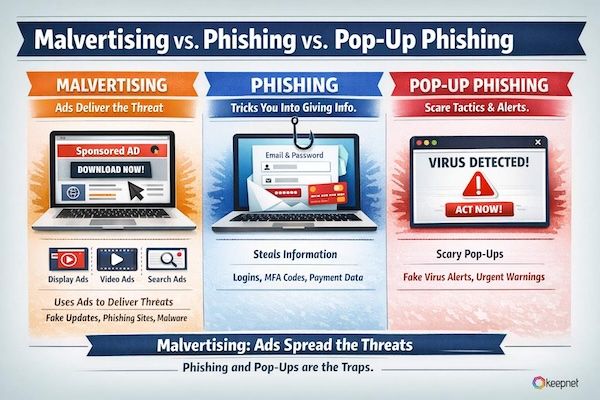
So malvertising isn’t “just pop-ups.” Pop-ups can be the landing stage, but malvertising is the distribution engine.
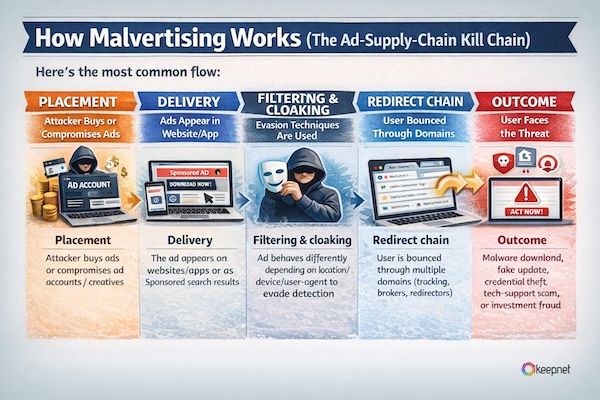
How Malvertising Works (The Ad-Supply-Chain Kill Chain)
Here’s the most common flow:
- Placement: attacker buys ads or compromises ad accounts / creatives.
- Delivery: the ad appears on websites/apps or as Sponsored search results.
- Filtering & cloaking: ad behaves differently depending on location/device/user-agent to evade detection.
- Redirect chain: user is bounced through multiple domains (tracking, brokers, redirectors).
- Outcome: malware download, fake update, credential theft, tech-support scam, or investment fraud.
Microsoft’s research describes malvertising redirectors embedded in streaming pages and multi-layer redirection leading to malware hosted on trusted platforms (e.g., GitHub), underscoring how “normal” browsing can be weaponized.
Real-World Malvertising Examples
Example 1: Redirectors → GitHub-hosted infostealers (large-scale campaign)
Microsoft Threat Intelligence reported a malvertising campaign detected in early December 2024 that impacted nearly one million devices, using redirectors on illegal streaming sites and multi-layer redirection that ultimately led victims to malware hosted on platforms like GitHub.
Example 2: “Sponsored” search impersonation (fake Google Ads)
Malwarebytes has reported campaigns where attackers run Sponsored ads impersonating Google Ads to steal advertiser accounts, proof that even “official-looking” Sponsored listings can be abused.
Keepnet platform
Turn awareness into secure behaviour
Training, multi-channel phishing simulations and reporting in one platform, measured by behaviour.
The Most Common Types of Malvertising in 2026
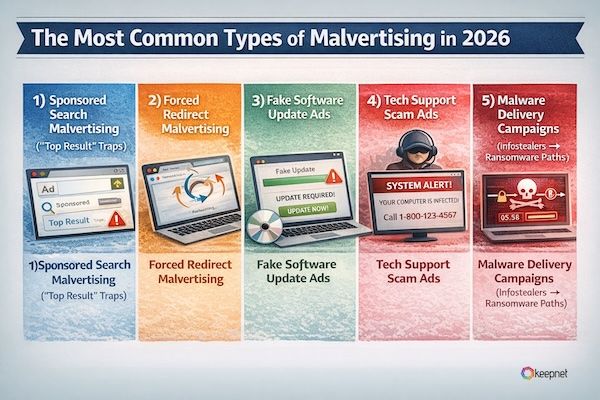
1) Sponsored Search Malvertising (“Top Result” Traps)
Attackers buy ads for keywords people trust (brands, tools, “download X,” “login Y”), then send users to lookalike sites.
Malwarebytes has reportedongoing campaigns using fake Google Ads (ads about Google Ads) to steal advertiser accounts, proof that even “official-looking” sponsored listings can be abused.
MITRE also explicitly notes that adversaries may purchase ads and place them prominently in search results to distribute malware.
Common bait queries attackers target:
- “download + [popular app]”
- “[brand] login”
- “install [software] free”
- “fix [error code]”
2) Forced Redirect Malvertising
You click a page (or sometimes just load it), and the ad triggers automatic redirects to scam pages, fake downloads, or malicious sites. Industry benchmarking reports track forced redirects and scam networks as major malvertising categories.
3) Fake Software Update Ads
4) Tech Support Scam Ads
These push victims into calling a number, granting remote access, and paying. Microsoft documents how tech support scams use fake warnings and “detections.”
5) Malware Delivery Campaigns (Infostealers → Ransomware Paths)
Google Threat Intelligence has described actors purchasing ads to lure users into downloading malware, which can lead to data theft and ransomware.
Microsoft also documented a large-scale campaign delivering info-stealers via malvertising redirect chains.
Can Malvertising Infect You Without Clicking?
Sometimes, yes, but it depends.
- Post-click malvertising (most common): you click a malicious ad and get redirected.
- Pre-click / drive-by scenarios: in certain cases, redirects and exploit kits can attempt infection without a clear “click” moment, especially when browsers/plugins are outdated.
The practical takeaway: don’t rely on “I didn’t click anything” as a safety guarantee, keep systems patched and block risky ad behaviors.
12 High-Confidence Red Flags of Malvertising
- The result is Sponsored but the domain looks slightly wrong.
- You’re pushed to “download” immediately from a non-official site.
- You see unexpected redirects (tab jumps, new windows).
- “Update your browser” prompts appear on random pages.
- The ad claims your device is infected and shows a phone number.
- The page disables back button / tries to trap the tab.
- The offer is too good (“Premium for free,” “limited-time investment”).
- The ad creative looks brand-like, but the advertiser details are odd.
- Download buttons are everywhere (classic “fake download” UI).
- Domain uses extra words: “-secure”, “-login”, “-verify”.
- You’re asked to install a “viewer,” “codec,” or “cleaner.”
- Your browser notification permission is requested immediately.
What To Do If You Think You Hit a Malvertising Ad
If you only saw redirects / suspicious landing pages
- Close the tab (don’t click buttons in the page).
- Clear the site’s permissions (notifications/popups) in browser settings.
- Report the URL to your security team or the platform (where possible).
If you downloaded something
- Do not run it.
- Delete it and empty recycle bin.
- Run your endpoint security scan.
- If it’s a work device: report immediately with the URL + filename.
If you installed or entered credentials
Treat it as an incident:
- Disconnect from network if instructed by policy.
- Reset passwords from a clean device and revoke sessions.
- Investigate for infostealers (cookies/session theft) and persistence.
How to Prevent Malvertising (Layered Defenses That Actually Work)
For individuals
- Prefer bookmarks for logins/downloads (avoid “download + brand” searches).
- Be skeptical of Sponsored results for sensitive actions.
- Use an ad/tracker blocker where policy allows.
- Keep browser/OS updated (drive-by risk drops significantly with patching).
For organizations (security/IT)
- DNS/web filtering + category blocking (newly registered domains, typosquats).
- Browser isolation for high-risk roles (finance, HR, admins).
- Block risky behaviors: forced redirects, popups, unauthorized downloads.
- EDR detections for infostealers and suspicious installers.
- Brand protection: monitor for ad impersonation of your org.
Industry-wide monitoring shows malvertising is persistent at scale: Confiant reports (PDF, opens in a new tab) that in 2024, one in every 90 impressions presented significant security/quality issues. GeoEdge also reports (PDF, opens in a new tab) a year-over-year surge in malvertising levels in 2024 and highlights redirects as a major behavior pattern.
How Keepnet Helps Against Malvertising
Malvertising is dangerous because it scales: one bad campaign can reach massive audiences through normal browsing and search behavior. The fix is not “tell people to never click ads”. It’s building safe pathways (bookmarks, official sources), reducing risky ad behaviors (redirects, fake updates), and training users to recognize Sponsored-result impersonation.
If you’re building a measurable human-risk program, Keepnet’s secure behaviour management platform that includes various tools like Security Awareness Training, and Phishing Simulation Software can help teams practice modern social engineering examples that start with malvertising distribution.
What This Means for Teams in 2026
Malvertising : How It Works, Real Examples, and How to Stop It is most useful when it helps teams make better day-to-day decisions. The strongest content does more than explain a concept. It shows where risk appears in real work, which actions matter first, and how teams can reduce confusion when the pressure is high.
That is why practical structure matters. A short explanation, a clear response path, and a few repeatable habits usually create more value than broad advice that looks complete but is hard to use.
Keepnet teams usually see stronger results when content like this is tied to a clear workflow, owner, and reporting path. A common mistake is treating malvertising : how it works, real examples, and how to stop it as background knowledge instead of a decision that shows up in real operations.
Keepnet Recommendation
- Translate the concept into a small set of practical decisions users can apply quickly.
- Focus on the workflows where the issue creates the most business exposure.
- Add reporting and escalation guidance so people know what to do under pressure.
- Review the content regularly so examples and priorities stay current.
Frequently asked questions
Malvertising is the use of online ads to spread malware, scams, or harmful redirects.
Yes. Because ads are often served via third-party networks/iframes, malicious ads can be delivered even on reputable sites.
No. Phishing is a technique (tricking users), while malvertising is a distribution channel (ads) that often leads to phishing or malware.
Not always. Attackers can buy ads to impersonate brands and push victims to malicious destinations.
Forced redirects, fake software updates, tech-support scams, credential theft, and malware/infostealer downloads.
In some cases, drive-by redirects and exploit kits can attempt infection without a clear click, especially on outdated systems.
A “Sponsored” result or ad that looks like a known brand, but uses a slightly wrong domain or pushes a download/login fast.
Close the tab, don’t run downloads, scan your device, and report the URL, especially if it was on a work device.
Use DNS/web filtering, browser isolation, download controls, EDR, and user training focused on Sponsored-result impersonation and redirect traps.
Attackers use cloaking and rapid account/domain rotation to evade ad-network review and policy enforcement.
Schedule your 30-minute demo now
You'll learn how to:
- Identify and simulate malvertising campaigns to test your team’s resilience against malicious ad-based delivery vectors.
- Customize phishing scenarios involving fake updates, forced redirects, and Sponsored result impersonations.
- Measure risk exposure and track human risk scores to improve defenses across departments.
30 minutes with a Keepnet specialist, on your own use cases.

Author
Ozan Ucar
Founder and CEO, Keepnet
Ozan founded Keepnet in 2017 and has worked in cyber security since 2006. He leads Keepnet's product direction and works with security teams on measuring and changing the behaviours behind incidents.