How to Allowlist Phishing Simulation Emails Without Weakening Real Security
Simulation emails that land in spam make your click rate meaningless. How to allowlist correctly in Microsoft 365, Google Workspace and third party gateways, without weakening real filtering.

On this page 9 sections
If your phishing simulation emails land in the spam folder, your test data is wrong. Not slightly wrong: the click rate you report to the board describes an email most of your people never saw.
Allowlisting fixes that. It tells your mail infrastructure to deliver simulation messages to the inbox while leaving real threat filtering untouched. Done properly it takes an hour. Done carelessly it opens a hole in your defences, which is why the second half of this page is about the limits.
This is a practical guide. Where a setup needs step by step screens, we link to the product documentation instead of repeating it here.
Why Do Phishing Simulation Emails Go to Spam?
Simulation emails are designed to look like phishing. That is the whole point, and it is also why filters catch them.
Four things trigger the block. The sending domain is new or unfamiliar to your tenant. The message contains a link that resolves to a domain your gateway has never seen. The content matches known phishing patterns, which it should. And in layered setups, a second filter blocks what the first one already passed.
The result is not a security win. A blocked simulation teaches you nothing and hides real exposure. The 2026 Data Breach Investigations Report puts the median click rate for email based simulations at roughly 1.4% (Verizon, 2026 Data Breach Investigations Report, 2026, p. 50). If half your messages never arrive, your number is not 1.4%, it is unknown.
What Allowlisting Actually Changes
Allowlisting creates a narrow exception. It applies to specific senders, specific IP ranges or specific message headers, and only to those.
What it does not do is disable filtering. Real phishing that arrives from a different sender, a different IP or without your header still gets blocked. This distinction matters when the security team pushes back, and they should push back, because a broad exception is a genuine risk.
The safe pattern is header based. Simulation messages carry a header your platform sets, the filter matches that header, and nothing else changes. An IP based exception is wider. A domain based exception is wider still.
Allowlisting in Microsoft 365
Microsoft 365 filters in more than one place, which is why a single rule often fails. Three layers usually need attention.
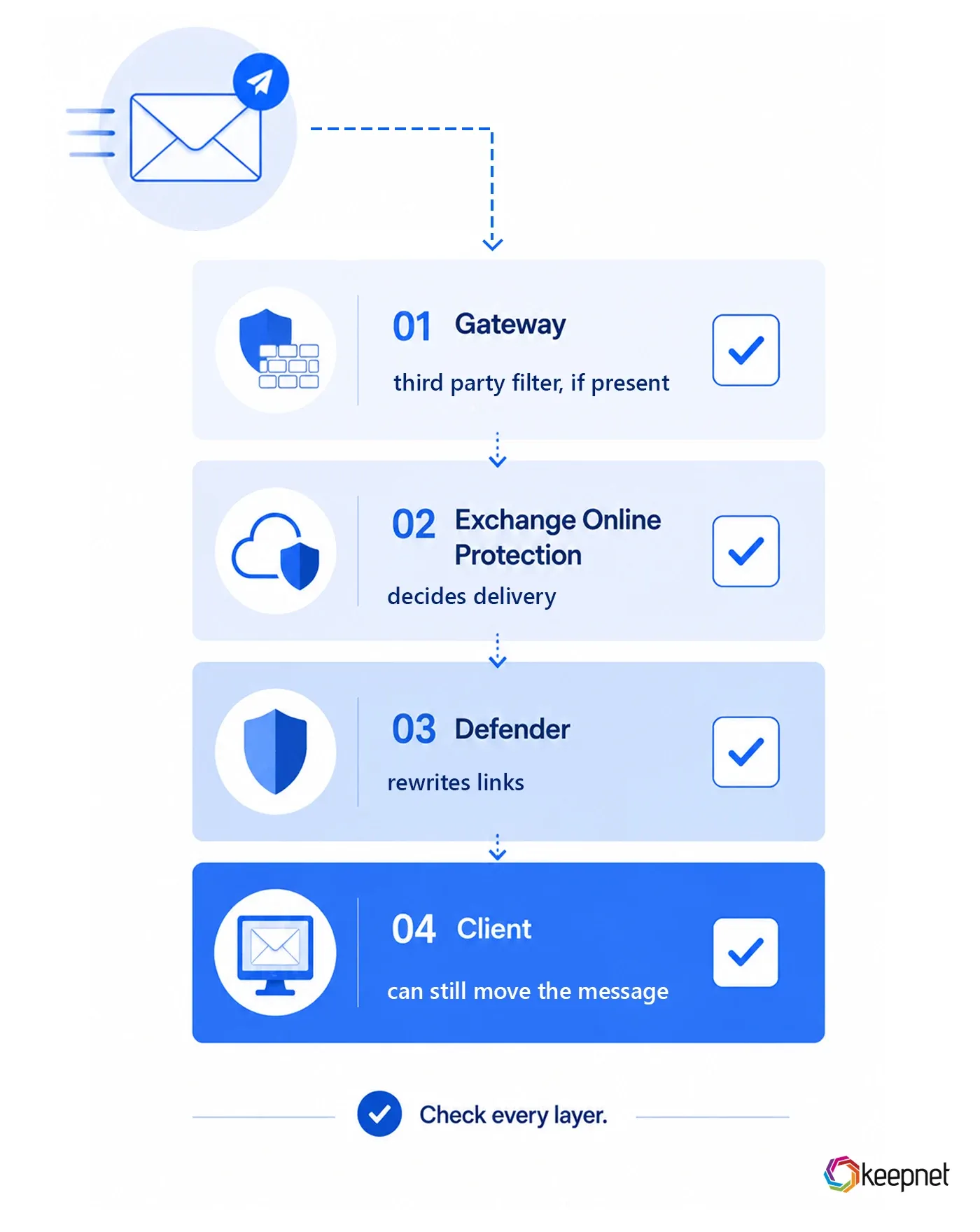
Exchange Online Protection. The connection filter and anti spam policy decide whether the message reaches the mailbox at all. This is where an IP or header exception belongs.
Microsoft Defender for Office 365. Safe Links rewrites URLs and Safe Attachments detonates files. A simulation link that gets rewritten breaks click tracking, so the simulation domains need an exception here separately.
SmartScreen and the client. Even after delivery, Outlook can move a message or strip a link. This is the layer most teams forget, and it produces the confusing case where the message arrives but the tracking shows nothing.
Microsoft also offers an advanced delivery policy built for phishing simulations. When available it is the cleanest route, because it tells the tenant that these messages are a test rather than an exception to security policy.
Step by step screens are in our documentation, allow listing in Microsoft 365.
Phishing Simulator
Multi-channel phishing simulations, not email-only
Run realistic simulations by email, SMS, call and QR code, and see reporting behaviour change over time.
Allowlisting in Google Workspace
Google Workspace is simpler in structure and stricter in enforcement.
The email allowlist under Gmail settings handles the sending IP range. Spam settings need a bypass entry for the simulation sender so that inbound rules do not requeue the message. If your tenant enforces Enhanced Pre Delivery Message Scanning, that scan runs after your allowlist rule and can still quarantine.
One detail catches teams out. Google evaluates rules per organisational unit. A rule applied at the top level does not automatically cover a child unit with its own settings, so a pilot group can pass while a department fails.
Third Party Gateways: Mimecast, Proofpoint and Others
If a gateway sits in front of your tenant, it filters first and your tenant filters second. Both need the exception, and the order matters.
In Mimecast the entry belongs in permitted senders and, where URL protection is active, in the managed URL list. In Proofpoint it belongs in the safe senders list and in the URL Defense exception. Whichever product you run, the rule is the same: every layer that can rewrite a URL needs to know about the simulation domains, or click data breaks even when delivery succeeds.
Deploying the Phishing Reporter Button
Allowlisting solves delivery. Reporting solves what happens next.
The reporting button lets an employee flag a suspicious message in one click, and it is what turns a workforce into a detection layer. Deployment goes through the same admin console as the rest of your mail policy, and it needs its own allowlist entry so that the add in can reach the platform.
The Keepnet phishing reporter covers Outlook, Microsoft 365 and Google Workspace. Reported messages land in one queue where they can be analysed and, if the campaign is real, removed from every mailbox that received it.
How to Verify It Worked
Do not assume delivery. Test it.
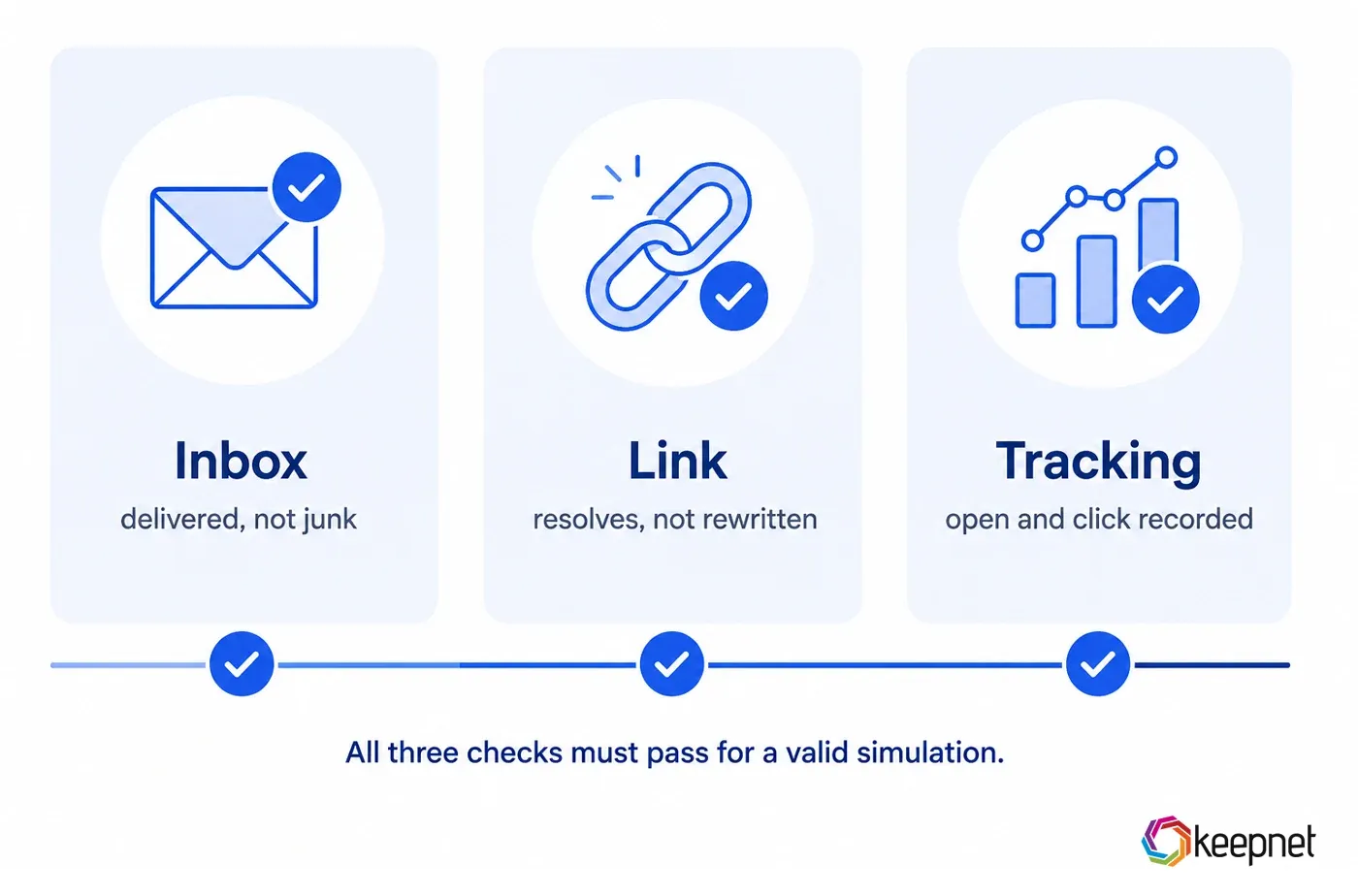
Send a simulation to a small pilot group across the platforms your organisation actually uses, then check three things: did the message reach the inbox rather than junk, did the link resolve without being rewritten, and did the platform record the open and click events. Running that pilot is straightforward from the phishing simulation platform.
If delivery works but tracking does not, the problem is URL rewriting, not the allowlist. If delivery works for some users and not others, the problem is scope, usually an organisational unit or a group policy that the rule did not cover.
Repeat this check after any change to your mail security stack. Vendor updates reset exceptions more often than teams expect.
The Security Question You Should Ask
A reasonable security team will ask whether this weakens the organisation. The honest answer is that it can, if done broadly.
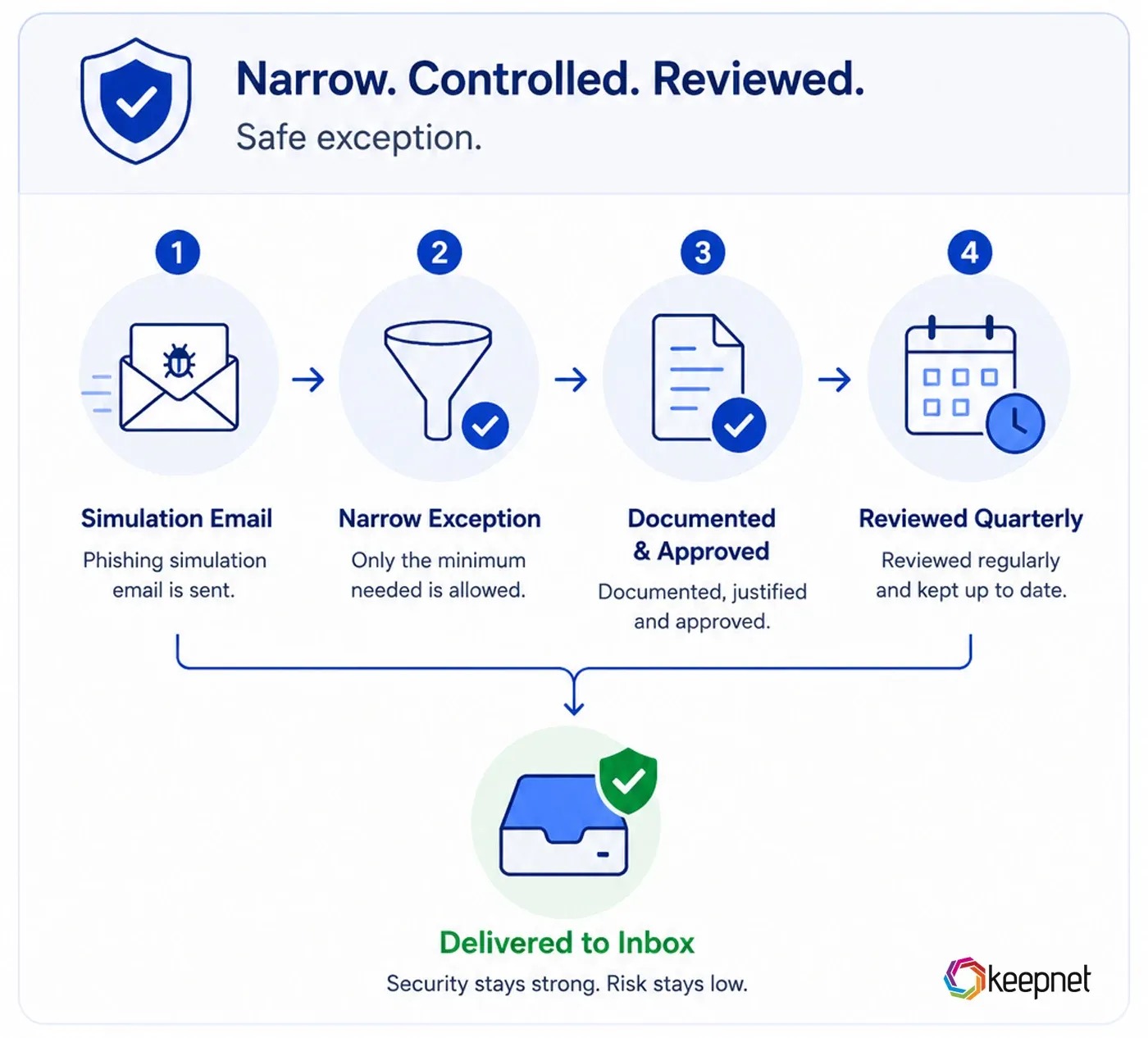
Three rules keep it safe. Scope the exception to the narrowest identifier available, preferably a header rather than a domain. Document it, including who approved it and when it expires. Review it quarterly, because an exception that outlives the platform it was created for is a standing hole.
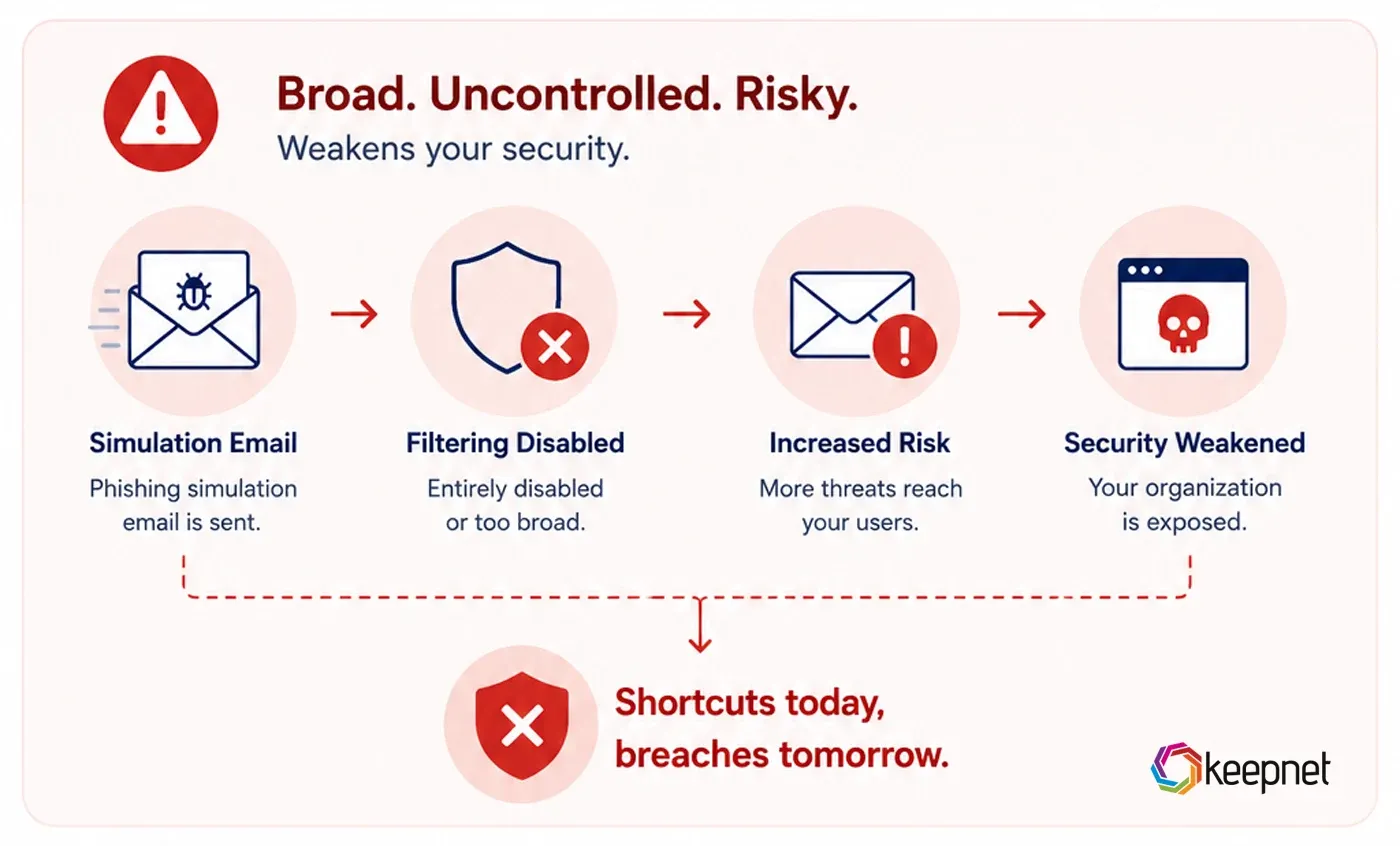
If a vendor tells you to disable filtering entirely for their simulation traffic, that is a reason to question the vendor rather than the policy. The same discipline applies to the rest of the programme: security awareness training is measured by behaviour, and behaviour cannot be measured on messages that never arrived.
Frequently asked questions
Not when it is scoped correctly. A header based exception applies only to messages carrying that header, so real phishing from any other source is filtered normally. The risk comes from broad exceptions, for example allowing an entire domain or disabling a filter category.
Almost always because one layer was missed. A tenant can filter at the gateway, at Exchange Online Protection, at Defender and at the client. An exception added at one layer does not apply to the others.
URL rewriting. Safe Links, URL Defense or an equivalent feature is replacing your simulation link with its own scanning URL, so the click registers against the scanner rather than the user. The simulation domains need an exception in the URL protection product specifically.
Yes, and it is a separate entry. The add in needs to reach the platform to submit a report, which means the platform endpoints have to be reachable from the client.
Quarterly is a reasonable cycle, and any change to your mail security stack should trigger an immediate check. Vendor updates frequently reset custom exceptions without notice.
Yes, and you should. Send to a small pilot group covering each mail platform in use, then confirm inbox delivery, link resolution and event tracking before the campaign goes wide.
Is your simulation data telling you the truth?
Book a Keepnet demo and run a simulation across email, voice, SMS and QR in one console.
- Deliver the test to the inbox.
- Keep real filtering untouched.
- Measure behaviour, not delivery failures.
30 minutes with a Keepnet specialist, on your own use cases.

Author
Ozan Ucar
Founder and CEO, Keepnet
Ozan founded Keepnet in 2017 and has worked in cyber security since 2006. He leads Keepnet's product direction and works with security teams on measuring and changing the behaviours behind incidents.