Cookie settings

Choose which cookies Keepnet can use. You can change this at any time from "Cookie settings" at the bottom of every page.

Keepnet API

Spend your team’s time on behaviour, not admin.

The Keepnet API runs the routine work from your own tools and AI agents, and puts the results where you report.

Book a demo

What changes for your team

Routine work leaves your team’s list

Joiners and leavers, handled without a ticket1 of 7

Joiners and leavers, handled without a ticket

Your HR or identity system adds and updates employees, and sets leavers inactive or deletes them, as your policy needs.

Your HR or identity systemA joiner, mover or leaver
POST /api/target-users
KeepnetEmployee added, updated, set inactive or deleted
See the API call
Add an employeeapi.keepnetlabs.com
POST /api/target-users
Authorization: Bearer $TOKEN

{
  "email": "jane.smith@example.com",
  "phoneNumber": "+44 7700 900123",
  "firstName": "Jane",
  "lastName": "Smith",
  "department": "Engineering",
  "isActive": true,
  "targetGroupResourceIds": ["<group id>"],
  "preferredLanguageId": "0",
  "managerEmail": "robert.johnson@example.com"
}

SCIM, LDAP and Google Workspace sync are set up through the API too.

Training starts when your process says so

A new joiner or a policy change in your workflow can start an enrolment.

Your workflowA new joiner or a policy change
POST /api/enrollments
KeepnetTraining starts, with a certificate at the end
See the API call
Start a training enrolmentapi.keepnetlabs.com
POST /api/enrollments
Authorization: Bearer $TOKEN

{
  "trainingId": "<training id>",
  "name": "Security awareness Q1",
  "targetGroupResourceIds": ["<group id>"],
  "languageIds": ["0"],
  "awardCertificate": true,
  "sendTeamsNotification": true
}

Then follow progress with POST /api/enrollments/search.

Campaign results in the BI tool your board already reads

Who opened, clicked or reported, per employee and per campaign, delivered to your data warehouse or BI tool on a schedule.

KeepnetWho opened, clicked or reported
POST …/job-report/…/search
Your BI toolPer employee and per campaign, on a schedule
See the API call
Who opened, clicked or reportedapi.keepnetlabs.com
POST /api/phishing-simulator/phishing-campaign-job-report/Reported/search/{resourceId}/{instanceGroup}
Authorization: Bearer $TOKEN

{
  "filter": {"searchInputTextValue": "", "condition": "AND", "filterGroups": [{"condition": "AND", "filterItems": [], "filterGroups": []}]},
  "pageNumber": 1,
  "pageSize": 20,
  "orderBy": "Email",
  "ascending": false
}

Swap Reported for Opened, Clicked, NoResponse or AttachmentOpened. Smishing and quishing follow the same pattern.

Reported emails reach the tools your SOC already runs

Your SIEM or SOAR pulls reported emails and acts on the verdicts.

An employeeReports a suspicious email
POST /api/notified-emails/search
Your SIEM or SOARPicks it up and acts on the verdict
See the API call
Reported emailsapi.keepnetlabs.com
POST /api/notified-emails/search
Authorization: Bearer $TOKEN

{
  "filter": {"searchInputTextValue": "", "condition": "AND", "filterGroups": [{"condition": "AND", "filterItems": [{"fieldName": "EmailCategory", "operator": "Include", "value": "Spam,Marketing"}], "filterGroups": []}]},
  "pageNumber": 1,
  "pageSize": 20,
  "orderBy": "CreateTime",
  "ascending": false
}
The executive report, without opening the console

The same widgets as your executive reports, delivered to your own dashboards.

KeepnetExecutive report widgets
POST /api/executive-report/get-widget-datas
Your dashboardBoard numbers, without opening the console
See the API call
Executive report widgetsapi.keepnetlabs.com
POST /api/executive-report/get-widget-datas
Authorization: Bearer $TOKEN

{
  "widgetIds": ["widget-phishing-overview", "widget-training-progress"],
  "datePeriod": "LastMonth"
}

The same widgets your scheduled executive reports use.

Audit evidence on request

Admin and service account actions export whenever a review or an auditor asks.

An auditorAsks for evidence
POST /api/audit-logs/search/export
Your evidence fileAdmin and service account actions, exported
See the API call
Export audit logsapi.keepnetlabs.com
POST /api/audit-logs/search/export
Authorization: Bearer $TOKEN

{
  "filter": {"searchInputTextValue": "", "condition": "AND", "filterGroups": [{"condition": "AND", "filterItems": [], "filterGroups": []}]},
  "pageNumber": 1,
  "pageSize": 25,
  "orderBy": "CreateTime",
  "ascending": false,
  "reportAllPages": true,
  "exportType": "Excel"
}
A new customer set up in one flow

MSSPs and resellers onboard a customer in one script, then run its campaigns and track renewals with the same Reseller client.

A new customerSigns with you
POST /api/companies, then 4 more calls
KeepnetCompany, SCIM and email delivery set up
See the API call
Onboard a customerapi.keepnetlabs.com
# 1. Create the customer company
POST /api/companies

# 2. Optional: an API client for the customer
POST /api/companies/clients

# 3. SCIM token and URL for the customer IdP
POST /api/scim

# 4. Direct Email Creation for Microsoft 365 or Google Workspace
POST /api/companies/direct-email-settings

# 5. Make it the default delivery
PUT /api/companies/direct-email-settings/make-default/{resourceId}

Steps after the first carry X-KEEPNET-Company-Id: <customer id>.

Your HR or identity system adds and updates employees, and sets leavers inactive or deletes them, as your policy needs.

One API behind these outcomes

  • 1,000+operations in one OpenAPI 3.0 specification
  • Every planno API tier, no add-on
  • MCPreference ready for AI assistants

Request bodies follow the published examples. As of 12 October 2026.

Keepnet AI agents

Ask in plain English, the agent calls the API

Agents in the console use the same API as your own tools, and each call shows in the chat with its status.

Book a demo

From the console A saved Reporting agent chat in dash.keepnetlabs.com, replayed. Figures are from Keepnet's own tenant. Part of Agentic AI.

  • Approval-gated by default: the agent recommends, an admin approves, then it runs.
  • Autonomous execution stays off until a system admin turns it on, within the safeguards you set.
  • Safeguards set when and how often the agent can act. Customer data is not used to train AI models.
Security and control

Automation your security team can sign off

Each integration gets its own client, role and IP range, and switches off on its own.

OAuth 2.0

Client credentials flow. The secret is shown once, at creation.

One-hour tokens

Bearer tokens expire after an hour. There is no long-lived refresh token.

Least privilege

Company Admin, Reseller or a custom role with only the privileges a job needs.

IP allow-list

Restrict each client to the addresses your servers use.

Switch off in one click

Set a client to inactive and its calls stop. Other clients keep working.

ISO/IEC 27001 and 42001

Certified for information security and for AI management.

AI under your control

Agent actions wait for approval by default. Customer data is not used to train AI models.

Versioned and backward compatible

Integrations keep working as the API grows. Test in a separate tenant first.

Data residency

Your data stays in the region you choose: the UK, EU, US, Canada, Türkiye or the UAE. New regions open on request.

Self-service set-up

Connected from your own console, no project needed

1. Create a client1 of 4

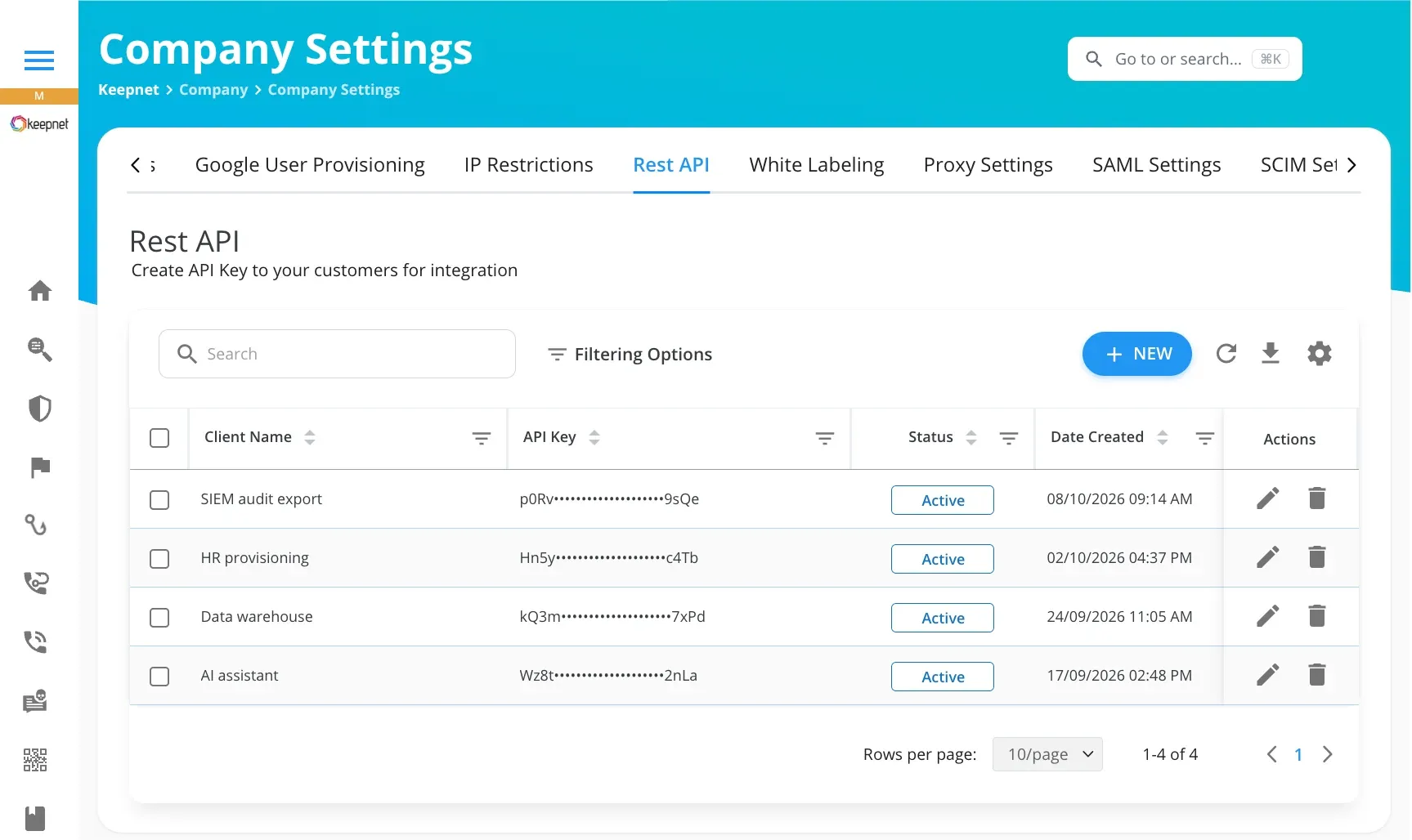
Step 1: Create a client

Company Settings, Rest API, New. One client per integration, so each one can be switched off on its own.

Keepnet console, Company Settings, Rest API: a list of API clients with masked keys and a New button
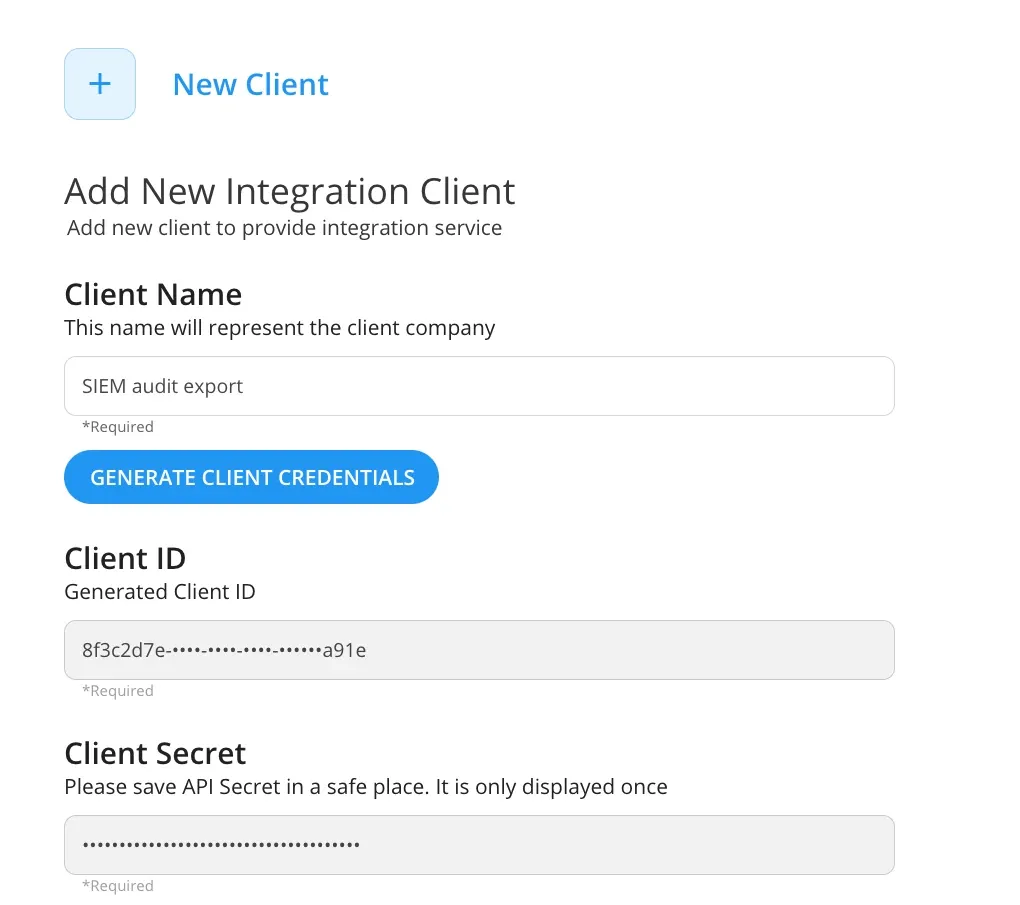
Step 2: Generate credentials

The console issues a Client ID and a Client Secret. The secret is shown once, so it goes straight to your vault.

Keepnet console, New Client form: client name, Generate Client Credentials, Client ID and a Client Secret shown once
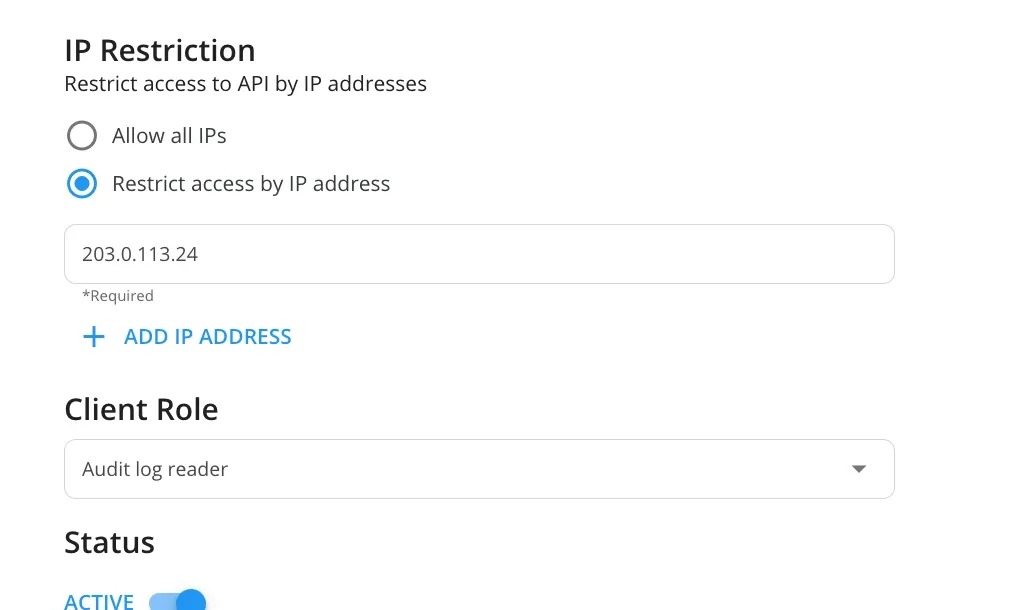
Step 3: Set the role and the IP range

A custom role with only the privileges the job needs decides which endpoints the client can reach. An IP allow-list limits where calls come from.

Keepnet console, New Client form: IP restriction to one address and a custom client role
Step 4: Get a token and call the API

OAuth 2.0 client credentials return a bearer token that lasts one hour. Request a new one when it expires.

Terminalapi.keepnetlabs.com
# 1. Token (form-encoded, not JSON)
TOKEN=$(curl -s -X POST https://api.keepnetlabs.com/connect/token \
  -H "Content-Type: application/x-www-form-urlencoded" \
  -d "grant_type=client_credentials" \
  -d "client_id=$KEEPNET_CLIENT_ID" \
  -d "client_secret=$KEEPNET_CLIENT_SECRET" \
  -d "scope=api1" | jq -r .access_token)

# 2. First call: your company
curl https://api.keepnetlabs.com/api/companies/my \
  -H "Authorization: Bearer $TOKEN"

Company Settings, Rest API, New. One client per integration, so each one can be switched off on its own.

Example data Client names are labels, and keys and addresses are placeholders. Read the quickstart

API coverage

Automate across the platform, not just reports

1,000+ operations, documented in one OpenAPI 3.0 specification.Keepnet OpenAPI specification, October 2026

Swipe to see more

Phishing simulation

Create and start email campaigns, then pull what each employee did.

SMS phishing

Start smishing campaigns and pull their results.

QR code phishing

Start quishing campaigns, resend to employees who did not open, and pull results.

Callback phishing

Create callback scenarios and campaigns, then pull their results.

Awareness training

Enrol employees, follow completion and certificates, and pull survey results.

Employees and groups

Add, import and export employees, and set up SCIM, LDAP or Google Workspace sync.

Reports

Executive and scheduled reports, gamification badges and leaderboards.

Incident response

Reported emails, investigations, delete and warn actions, and analysis engines.

Behaviour and nudges

Queue a nudge from behaviour already recorded for an employee, and manage Power BI access.

Company settings

SIEM forwarding, SAML, white labelling and sending domains.

Partners and resellers

List customers with licence details, onboard a customer and scope calls to one company.

Audit logs

Search and export admin and service account actions.

1 of 12

Evaluating APIs

Six questions to ask of any security awareness API

Ask these before you choose, and check each answer in the reference.

QuestionKeepnet
Can it create and change things, or only read reports?Both. It creates and changes employees, groups, enrolments, campaigns and settings.
Does it cover simulations, training, reporting and response?Yes, in one API.
Is it in my plan, or a higher tier?Included in every plan.
Is there a machine-readable specification?Yes, OpenAPI 3.0, with request examples.
Can AI assistants work with it within your controls?Yes. They read the reference over MCP, and every call runs with your own client, its role, IP allow-list and one-hour tokens.
Can a partner manage many customers?Yes. One Reseller client reaches every customer, and each call picks the customer with one header.
For developers

Your developers can start without waiting for us

Public reference and specification. No sales call needed to read them.

Your first call, in two requests

Terminalapi.keepnetlabs.com
# 1. Swap your Client ID and Client Secret for a token (valid one hour)
TOKEN=$(curl -s -X POST https://api.keepnetlabs.com/connect/token \
  -d grant_type=client_credentials -d scope=api1 \
  -d client_id=$KEEPNET_CLIENT_ID \
  -d client_secret=$KEEPNET_CLIENT_SECRET | jq -r .access_token)

# 2. List your ten newest phishing campaigns
curl -X POST https://api.keepnetlabs.com/api/phishing-simulator/phishing-campaign/search \
  -H "Authorization: Bearer $TOKEN" \
  -H "Content-Type: application/json" \
  -d '{"filter":{"searchInputTextValue":"","condition":"AND","filterGroups":[]},
       "pageNumber":1,"pageSize":10,"orderBy":"CreatedDate","ascending":false}'

# Results come back in data, with status and message beside them

Prefer a ready connector? See the integrations

Your coding agent

Your coding agent builds the integration with you

Claude Code1 of 3

Claude Code: results to your warehouse

Creates a nightly export of campaign results for your data warehouse.

Cursor: reports closed from your soar

Adds a step that closes a confirmed report and thanks the employee.

Codex: training for every joiner

Enrols the week's new joiners in training, with a certificate.

Creates a nightly export of campaign results for your data warehouse.

Example session Any coding agent that supports MCP works the same way. Product names are trademarks of their owners.

Connect your assistant

MCP server
https://doc.keepnetlabs.com/~gitbook/mcp

Set up your assistant with MCP

Your guardrails still apply

  • The secret stays in your vault or environment, not in the chat.
  • The client role sets which endpoints an agent can reach.
  • An IP allow-list limits where calls come from.
  • Tokens expire after one hour, and service account actions reach the audit log.

API pricing

No API tier to budget for

The API comes with every plan, along with admin accounts, SSO and SAML.

Book a demo

See the plan prices

Questions

What buyers ask about the Keepnet API

Short answers, with the detail below each one.

Yes. The Keepnet REST API covers phishing simulation, security awareness training, reporting and incident response, with 1,000+ operations in one OpenAPI 3.0 specification.

It comes with every Keepnet plan.

An admin creates an API client under Company Settings, Rest API. Keepnet issues a Client ID and a Client Secret in place of a single API key, and the secret is shown once.

Pick a role for the client, limit it to your IP addresses, and switch it off at any time.

Send the Client ID and Client Secret to POST /connect/token with grant_type=client_credentials and scope=api1.

The bearer token lasts one hour and there is no refresh token, so request a new one when it expires.

The interactive reference (Swagger UI) is at api.keepnetlabs.com/docs, with the OpenAPI 3.0 specification on the same site. The quickstart and use-case guides are on doc.keepnetlabs.com.

Most platform work. For example: add and remove employees, start simulations and training enrolments, pull campaign and training results, export audit logs and act on reported emails.

It covers email, SMS, QR code and callback phishing simulations, awareness training, reporting, incident response and company settings.

Yes. Power BI connects with DirectQuery, using SQL credentials scoped to your company that you can rotate at any time.

Other BI tools pull campaign, training and report data through the API.

Yes. Create a SCIM integration in Keepnet and your identity provider adds, updates and removes employees, with the attributes you map. The SCIM token can be rotated at any time.

LDAP and Google Workspace sync are also available.

Yes. SIEM forwarding sends Keepnet audit logs and events to Microsoft Sentinel, Splunk, QRadar or a syslog server, and you can send a test event before going live.

Your SOAR can also act on Incident Responder verdicts through the API.

There is no fixed request quota. Limits follow your organisation's usage, and a request over the limit returns HTTP 429.

Wait and retry with back-off, and reuse a token until it expires instead of requesting one per call.

Yes. The API is versioned and stays backward compatible, so existing integrations keep working as it grows.

Build and test against a test environment or a test tenant before you go live.

Not by default. Agents run in approval-gated mode: they recommend an action and run it only after an admin approves.

A system admin can turn on autonomous execution, which then runs within the operational and governance safeguards you set.

Yes, for the API reference. Connect doc.keepnetlabs.com/~gitbook/mcp to Claude, ChatGPT, Cursor, Codex or another MCP client, and it finds the right endpoint and builds the call.

The calls run with your own API client, so its role, IP allow-list and one-hour tokens limit what an agent can do.

No. The API, admin accounts, SSO and SAML come with every Keepnet plan, with no API tier or add-on.

Yes. One Reseller client reaches every customer: it lists them with licence details, onboards new ones, and picks the customer for each call with the X-KEEPNET-Company-Id header.

Partners can also list customers over their licence limit and renewals due within a window they set.

Book a demo

See Keepnet with your organisation in mind

  1. See the API on your own use caseSIEM, SOAR, identity, BI or partner workflows.
  2. Create a client with your role and IP rulesAnd see where the secret is shown, once.
  3. Ask an AI assistant to make the callThrough the Keepnet API reference over MCP.
  4. Connect your own toolsIf it fits, a proof of value follows, on your timeline.
Tom, Matt, Ellie and Shonna, the Keepnet team you will meet
Who you will actually meet
Tom, Matt, Ellie and Shonna
Across UK and US time zones

Book a demo

Thirty minutes, no cost and no obligation.

Required
Required
Please use your work email address
Where your organisation is based.
Please pick a country from the list
Start with + for another country code.
Please enter a phone number we can call you on
Required
Employees
Please pick a size
Please pick one

Bring your setup and questions, and we will map Keepnet to your programme. No employee data needed.

Thank you, your request is in

A confirmation is on its way to your inbox.

Sources
  1. Keepnet OpenAPI 3.0 specification, api.keepnetlabs.com/swagger/v1/swagger.json, as of 19 October 2026: 850+ paths and 1,000+ operations. api.keepnetlabs.com/swagger/v1/swagger.json
  2. Keepnet API Quickstart, doc.keepnetlabs.com, October 2026. doc.keepnetlabs.com/api-reference/quickstart
  3. Use the API with AI assistants (MCP), doc.keepnetlabs.com, October 2026. doc.keepnetlabs.com/api-reference/use-the-api-with-ai-assistants-mcp
  4. REST API, Company Settings, doc.keepnetlabs.com, October 2026. doc.keepnetlabs.com/next-generation-product/platform/company/company-settings/rest-api

Page reviewed